

Messaging is replacing many channels of communication as we know them today, and the automated message has become a key part of that shift. The open rate of email is declining in many sectors; however, messaging apps continue to grow in user base. A report published by Statista reports over 2.7 billion users worldwide use WhatsApp. Businesses are now utilizing messaging channels and automated message systems to enable customer communication, provide support, and enact marketing strategies for their products.
This shift has created a challenge, in that customers now expect rapid response times. There are many businesses that cannot provide thousands of manual replies every time an incoming message comes through. This is why utilizing an automated messaging system is necessary.
Let’s look at what automated messages are, the reasons for businesses using automated messaging systems, and how the companies who use these systems see their response time and subsequent revenue increase.
What Is an Automated Message?
An automated message is a pre-configured response sent by software when a trigger occurs. The trigger can be a user action, a time event, or a keyword in a conversation.
Businesses use automated messages in:
- Customer support
- Lead capture
- Appointment reminders
- Order confirmations
- Product promotions
- Event updates
Messaging platforms allow companies to configure automated workflows. When a user sends a message or completes a form, the system sends a reply without human input.
Many businesses use platforms connected to the official messaging infrastructure of Meta Platforms through the WhatsApp Business API.
This allows large-scale communication with customers.
Example triggers for automated messages
| Trigger Event | Automated Response |
|---|---|
| Customer sends “Hi” | Welcome message with menu options |
| User fills website form | Confirmation message |
| Order completed | Order confirmation and receipt |
| Appointment scheduled | Reminder message before appointment |
| Customer inactive for 7 days | Follow-up message |
Automated messaging allows businesses to manage communication at scale without increasing staff.

The Problem: Businesses Cannot Reply to Every Message Manually
Customer expectations changed. Messaging response speed now affects purchase decisions.
Research from HubSpot shows:
- 82% of customers expect an immediate response when they contact a business.
- Many companies respond after several hours or even days.
This delay leads to three major problems.
1. Missed Leads
When users send product inquiries and receive no reply, they move to another provider.
2. Support Backlog
Customer support teams receive hundreds of repetitive questions such as:
- Product price
- Delivery time
- Store location
- Order status
Answering these questions manually consumes time.
3. Lost Sales Opportunities
Slow communication often means abandoned conversations. Messaging automation helps companies maintain communication without delays.

The Agitation: Slow Communication Reduces Conversion Rates
Slow response time affects revenue. A study from InsideSales.com analyzed lead response behavior and found that companies responding within 5 minutes were significantly more likely to convert leads than companies responding after 30 minutes. Messaging automation solves this gap by sending instant replies.
For example:
- Greeting message when a customer starts a chat
- Automated product catalog
- Instant support menu
- Order confirmation message
These messages keep users engaged in the conversation.
Messaging platforms such as WhatsApp also report higher message open rates compared to email marketing systems.
Communication Channel Comparison
| Channel | Average Open Rate | Response Time |
|---|---|---|
| 20–30% | Several hours | |
| SMS | 90% | Minutes |
| Messaging Apps | 90%+ | Seconds |
Messaging automation ensures that a response happens immediately.

The Solution: Automated Messaging Systems
Automated messaging platforms allow companies to design communication flows that run automatically. The system monitors incoming messages and sends predefined responses based on rules. Businesses configure automation through messaging tools that connect with the official messaging infrastructure.
For example, platforms like https://waplify.io/ allow companies to manage messaging campaigns using the official API connection.
Through automation, companies can:
- Send welcome messages
- Broadcast updates
- Capture leads
- Send reminders
- Deliver support menus
Automation platforms allow teams to control these messages from a single dashboard.
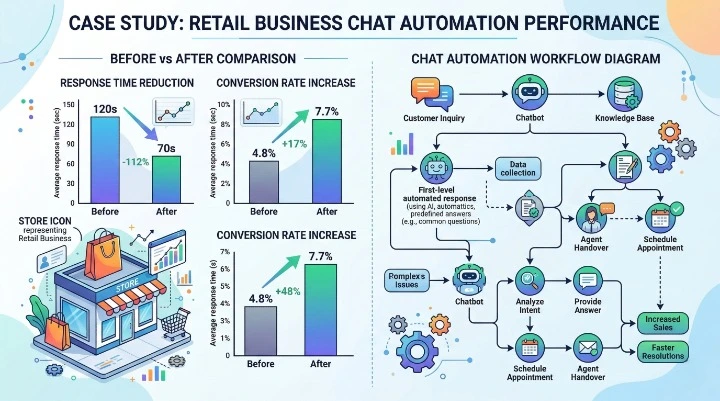
Case Study: Automated Messaging in a Retail Business
A mid-size online retail store implemented automated messaging for customer communication.
Situation
The company received around 900 messages per day through WhatsApp. Support agents handled:
- Order status questions
- Delivery updates
- Product availability
- Return requests
Response delays reached 4 hours on average.
Implementation
The company implemented automation using the official API. The workflow included:
- Greeting message when a customer starts chat
- Order status automation
- Product inquiry menu
- Delivery notification message
- Broadcast updates for promotions
Results After 3 Months
| Metric | Before Automation | After Automation |
|---|---|---|
| Daily messages handled | 900 | 900 |
| Average response time | 4 hours | Instant |
| Support tickets | 900 | 250 |
| Sales conversion rate | 3.2% | 6.8% |
The automated system handled repetitive questions while support agents handled complex requests.
Types of Automated Messages Businesses Use
Different business goals require different automation types.
Common automated message categories
| Type | Purpose | Example |
|---|---|---|
| Welcome Message | First interaction | “Thanks for contacting us” |
| Order Confirmation | Purchase confirmation | “Your order has been placed” |
| Appointment Reminder | Reduce missed appointments | “Reminder: Appointment tomorrow” |
| Lead Capture | Collect customer data | “Reply with your email” |
| Broadcast Message | Send updates to contacts | “New product launch today” |
| Support Menu | Guide users | “Reply 1 for support, 2 for orders” |
Each message type supports a stage in the customer journey. Businesses often combine several automations flows to create a full messaging system.

Best Practices for Automated Message
Automation must follow platform policies and communication guidelines. The official documentation from Meta Developers explains messaging policy rules and automation restrictions.
Businesses should follow several best practices.
1. Use clear triggers
Automation should activate based on specific actions.
Examples:
- Keyword messages
- Form submissions
- Purchase events
2. Provide menu options
Users should be able to navigate the conversation easily.
3. Include human support escalation
Automation should transfer the conversation to a human when needed.
4. Avoid message overload
Sending too many automated messages may reduce engagement.

How Automated Messaging Improves Business Operations
Messaging automation affects several areas of business operations.
Operational impact
| Area | Impact |
|---|---|
| Customer support | Reduced manual workload |
| Marketing | Broadcast campaigns |
| Sales | Lead qualification |
| Operations | Appointment reminders |
| Customer experience | Faster communication |
Automation allows companies to handle communication without expanding support teams.
Businesses using messaging automation also gain access to analytics dashboards showing:
- Message delivery rates
- Read rates
- Conversation volume
- Campaign performance
How to Implement Automated Messaging
Implementing automation requires several steps.
Step-by-step process
- Identify common customer questions
- Define messaging workflows
- Connect messaging platform
- Configure automated replies
- Test conversation flows
- Launch messaging campaigns
Businesses can implement automation using platforms that integrate with messaging APIs.

Future of Automated Messaging
Messaging automation continues to expand as businesses shift toward conversational communication.
Automation now integrates with:
- AI chat systems
- CRM systems
- Marketing platforms
- Customer support systems
According to industry reports from Gartner, a growing portion of customer interactions will involve automated systems. Messaging channels remain central to this change because users prefer communication through messaging apps instead of phone calls or email. Automation will continue to evolve as businesses look for ways to handle customer communication at scale.
Final Thoughts
Automated message systems allow businesses to manage customer communication without delays. Companies that rely on messaging channels must respond quickly to maintain engagement. Automation ensures instant replies, reduces support workload, and supports marketing campaigns. Businesses that implement automated messaging through official messaging infrastructure can scale communication while maintaining compliance with messaging policies.
Platforms like https://waplify.io/ help businesses manage messaging campaigns, automation workflows, and broadcast communication from a single dashboard. As messaging adoption continues to grow, automated message will remain a key system for companies that want to improve response speed and maintain customer engagement.