

Introduction: Why WhatsApp Web Business is Your Secret Sales Weapon
Let’s be truthful. Today’s corporate environment is fast-paced, fiercely competitive, and daunting. Your clients desire prompt responses. They desire a sense of worth. And they want answers now, not tomorrow. For this reason, WhatsApp Web Business has quietly emerged as the world’s most potent sales tool.
Consider it. WhatsApp is now more than just a messaging service, with over 3 billion active users worldwide. Customers are already using it to browse, converse, and make purchases. And when you combine that reach with WhatsApp Web Business’s desktop capabilities, you have a productivity powerhouse that has the potential to completely change the way you conduct business.
This tutorial will teach you seven tried-and-true strategies for using WhatsApp Web Business to increase sales, satisfy clients, and outperform rivals. These tactics are effective whether you’re a freelancer, small business owner, or managing an expanding online store. Now let’s get started.
Quick Stat: WhatsApp messages have a 98% open rate — compared to just 20% for email. That’s not a typo. (Source: Chatarmin, 2026)
Secret #1 — Set Up Your WhatsApp Web Business Profile Like a Pro

Your online storefront is your company profile. Your profile indicates your level of trustworthiness as soon as a customer opens your conversation. Thus, don’t omit this step.
Your WhatsApp Web Business profile needs to contain the following information:
- A crisp, polished company logo (at least 500 x 500 pixels)
- A strong two-line synopsis of your company that highlights your main offering
- Your website URL, such as Waplify.io for WhatsApp marketing tools, should be linked to your primary landing page.
- Precise business hours that let clients know when to anticipate responses a company category to ensure accurate listing on WhatsApp.
After completing your profile, use your desktop browser to visit web.whatsapp.com and use your mobile WhatsApp Business app to scan the QR code. Now that you’re using WhatsApp Web Business on a large screen, everything is different.
Secret #2 — Use Quick Replies to Save 3 Hours Every Single Day
The unpleasant reality is that the majority of business owners spend two to three hours every day repeatedly responding to the same inquiries. “What’s your price?” “Do you deliver?” “How long does it take?”
This is permanently resolved by WhatsApp Web Business’s Quick Replies feature. For your most popular answers, you may make keyboard shortcuts that you can use in a matter of seconds.
How to set up Quick Replies:
- On your PC, launch WhatsApp Web Business.
- Select Settings → Quick Replies → Business Tools.
- To add a new response, click the “+” button.
- Enter your message and designate a shortcut such as “.delivery” or “.pricing.”
The next time, simply put “.price” into any chat window, press submit, and you’re done!
Expert Advice: Write at least ten brief responses to your most often asked questions. Your consumers will be impressed by how quickly you respond, and you will reduce your response time by 80%.
Secret #3 — Automate Welcome Messages and Away Messages
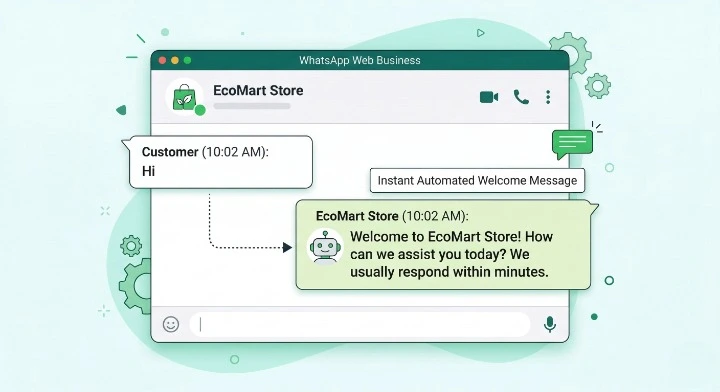
Consider this scenario: On a Friday at 11 p.m., a prospective client messages you. They receive silence in the absence of automation, and by morning, they have already made a purchase from your rival.
You may use WhatsApp Web Business to set up automated messages that reply promptly, day or night, even while you’re asleep.
Two messages you must set up today:
- Welcome Message: Automatically extends a greeting to each incoming client. For instance: “Hello! Greetings from [Your Business]. We’ll respond to you in an hour. Look through our catalog at [link].
- Away Message: Reacts when you’re not online. For instance: “I appreciate you getting in touch! We will respond by 9 a.m. tomorrow, but we are presently closed. Go to [link] for immediate assistance.
It is much simpler to type and edit your messages using a full keyboard when you can control all of these options directly from WhatsApp Web Business on your desktop. Check out Waplify.io for even more potent automation solutions; they provide sophisticated automation designed especially for WhatsApp marketing.
Secret #4 — Organize Customers with Labels (Your CRM Is Already Built In)
The majority of entrepreneurs are unaware that WhatsApp Web Business comes with an integrated client management solution. Labels is the name of it, and it’s totally free.
You can track a customer’s exact position in your sales process by using labels to tag every conversation. Don’t neglect to follow up any longer. No more unsuccessful leads.
Recommended label system for any business:
- New Lead: Initial communication
- In Discussion: Actively discussing a purchase
- Payment Pending: Awaiting payment
- Order Confirmed: Paid and completed
- Follow-up: To clinch the deal, a little prodding is required.
The best thing about WhatsApp Web Business on desktop is that you can quickly view all of your tagged chats on a larger screen, making customer management and filtering simple. Imagine it as a lightweight, free CRM integrated within your messenger.
Secret #5 — Use the Product Catalog to Sell Without a Website
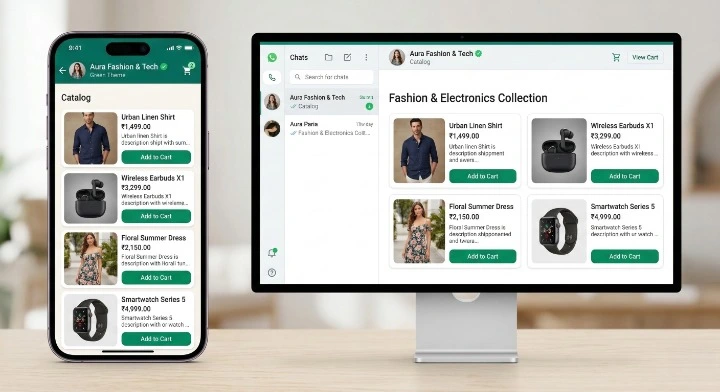
Lack a website? No issue. You can build a complete product catalog right within WhatsApp with WhatsApp Web Business. Up to 500 products with images, costs, descriptions, and links can be listed.
Consumers can peruse your catalog directly within the chat window, add products to their cart, then message you to finish the transaction. It’s the most straightforward e-commerce experience there is, and it functions flawlessly on desktop WhatsApp Web Business, where you can do anything with ease.
How to build your catalog:
- Select Settings → Business Tools → Catalog.
- Select “Add Product or Service”
- Provide a detailed description, a pricing, and a high-quality photo.
- Post a direct link to your catalog in chats or on your social media bios.
Real Outcome: Compared to manually sharing product photos, businesses utilizing the WhatsApp catalog function report up to 40% more product queries. Begin constructing yours right now.
Secret #6 — Send Broadcast Messages to Grow Sales Without Being Spammy
One of WhatsApp Web Business’s most underutilized functions is broadcasting; companies that use it effectively have enormous sales surges, particularly during offers, launches, and seasonal promotions.
A broadcast distributes individual messages to every recipient, as contrast to a group message. It feels more intimate than a mass explosion because recipients don’t see one another. However, only contacts who have saved your number will be able to receive your broadcasts.
Best practices for WhatsApp broadcasts that convert:
- Avoid using corporate jargon; instead, keep messages brief, intimate, and conversational.
- “Reply YES to receive your 20% discount” is a clear call to action that should always be included.
- Send broadcasts during periods of high engagement: 6–8 p.m. or 9–11 a.m.
- To avoid being blocked, send no more than two to three broadcasts every week.
- Use Labels to segment your list for communications that are specifically targeted (see Secret #4).
WhatsApp Web Business could not be sufficient for extensive broadcast efforts. Platforms like Waplify.io, which enable bulk messaging with intelligent segmentation, scheduling, and analytics to boost your outreach without jeopardising your account, can help.
Secret #7 — Multi-Device Support: Manage Your Business From Anywhere
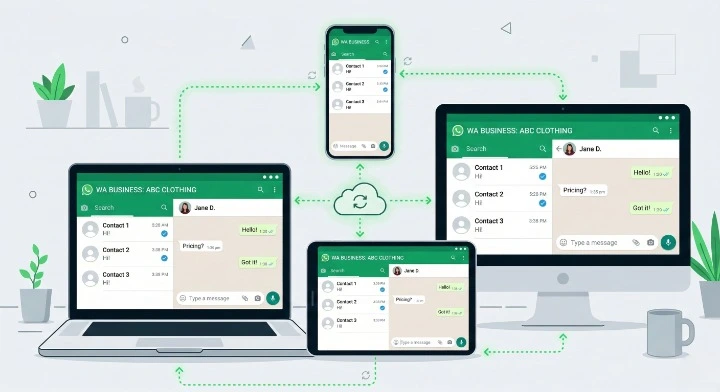
Proper multi-device functionality is one of the most significant enhancements to WhatsApp Web Business in recent years. Up to four devices can now be linked to your WhatsApp Business account at once, or up to ten devices with WhatsApp Business Premium.
This implies that your client discussions are unaffected even when you move devices, your messages remain in sync even when your phone is offline, and your support staff may all use the same WhatsApp Web Business account from multiple PCs.
How to link a new device:
- On your phone, launch WhatsApp Business.
- Select Settings → Linked Devices → Connect a Device.
- Open web.whatsapp.com on your laptop, then scan the QR code.
- You are now live on WhatsApp Web Business on your desktop!
Upgrade Tip: You may connect up to ten devices with WhatsApp Business Premium, which also provides you with a web site within WhatsApp and a bespoke short link (wa.me/yourbusiness). ideal for expanding teams.
Bonus: 3 Critical Mistakes to Avoid on WhatsApp Web Business

It’s equally crucial to know what not to do as it is to know what to do. The three most frequent errors that cause problems for businesses are as follows:
- Sending unsolicited messages: Prior to messaging customers, always obtain their authorization. Your account may be banned by WhatsApp due to spam allegations, and it is very hard to get a banned number back.
- Using your personal number for business: Keep your personal and professional lives apart. On WhatsApp Web Business, a dedicated business number safeguards your privacy and appears professional.
- Ignoring the analytics: WhatsApp Business displays message statistics (read, sent, and delivered). You won’t know what’s effective if you ignore these figures. Every week, check them.
Quick Comparison: WhatsApp Business App vs WhatsApp Web Business vs API
| Feature | Mobile App | WhatsApp Web Business | API |
| Desktop Access | No | Yes | Yes |
| Multi-Device | Up to 4 | Up to 4 (10 Premium) | Unlimited |
| Automation | Basic | Basic | Advanced |
| CRM Integration | No | No | Yes |
| Cost | Free | Free | Paid |
| Best For | Solo owner | Small teams | Growing business |
Take It Further with Waplify.io
The built-in tools are a terrific place to start if you’re serious about using WhatsApp Web Business to expand your business, but they have limitations. Waplify.io can help with that.
Waplify is a potent WhatsApp marketing tool designed for companies looking to grow. It provides:
- Bulk Broadcast Messaging with audience segmentation
- AI-powered Chatbot Automation to handle inquiries 24/7
- Real-time Analytics Dashboard to track open rates and conversions
- CRM Integration to manage your customer pipeline
- Message Scheduling to send at the perfect time
Visit Waplify to see what’s possible if you’re already utilizing WhatsApp Web Business and want to 10x your results.
Conclusion: Start Using These Secrets Today
Here are seven tried-and-true tips to help you make the most of WhatsApp Web Business in 2026. Let’s quickly review:
- Create an amazing business profile.
- To save hours, set up Quick Replies.
- Automate your farewell and greeting messages.
- Labels can be used as a free CRM.
- Create a catalog of products to sell without a website.
- Manage your team by using multi-device access and sending intelligent, targeted broadcast messages.
Businesses that meet their clients where they are on WhatsApp are the ones that will succeed in 2026. With just one free tool, WhatsApp Web Business gives you the desktop capability to manage more conversations, close more transactions, and forge stronger bonds.
Are you prepared to advance? To begin, go to web.whatsapp.com and immediately create your profile. Remember to check out Waplify.io for cutting-edge WhatsApp marketing tools that will help you grow your company.
Share this post: If you found this tutorial useful, forward it to another business owner who still uses email exclusively. They’ll be grateful!
FAQ — WhatsApp Web Business
Is WhatsApp Web Business free?
Yes! You can use WhatsApp Web Business for free. You don’t need a subscription to access it at web.whatsapp.com. Advanced features can be purchased with the Premium plan and API.
Can I use WhatsApp Web Business on multiple computers?
Absolutely. WhatsApp Web Business is ideal for small teams because it can support up to 4 linked devices at once (and up to 10 with the Premium subscription).
Is WhatsApp Web Business safe?
Yes, just like the smartphone app, WhatsApp Web Business offers end-to-end encryption for all messages. When utilizing shared computers, just remember to log out.
What’s the difference between WhatsApp Web Business and the WhatsApp Business API?
The browser-based version of WhatsApp for solo operators and small businesses is called WhatsApp Web Business. For larger companies that require automation, CRM integration, and large-scale team communication, the WhatsApp Business API offers an enterprise option. You may easily use these API functionalities using platforms such as Waplify.io.


