
The main difference between WhatsApp Broadcast and Group analytics lies in the type of engagement they measure: Broadcasts provide direct funnel metrics (Sent, Delivered, Read) for individual marketing ROI, while Groups offer qualitative signals focused on community interaction and sentiment. Businesses seeking precise conversion data should prioritize Broadcast lists, whereas those measuring brand loyalty and peer-to-peer support should focus on Group activity levels. Understanding this distinction is the first step to mastering WhatsApp marketing.
The Data Gap in WhatsApp Business Communication
WhatsApp is the world’s most popular messaging app. It allows businesses to talk directly to customers. However, many business owners face a data gap. They send messages but struggle to understand if those messages work. Unlike email, which has detailed tracking, standard WhatsApp tools can feel limited.
To grow a business, you need numbers. You need to know who is reading your messages and who is buying your products. This guide compares the two main ways to reach people: Broadcast Lists and Groups. We will look at the specific data points each one offers so you can choose the right tool for your goals.
The Fundamental Difference Between Broadcast and Group Analytics
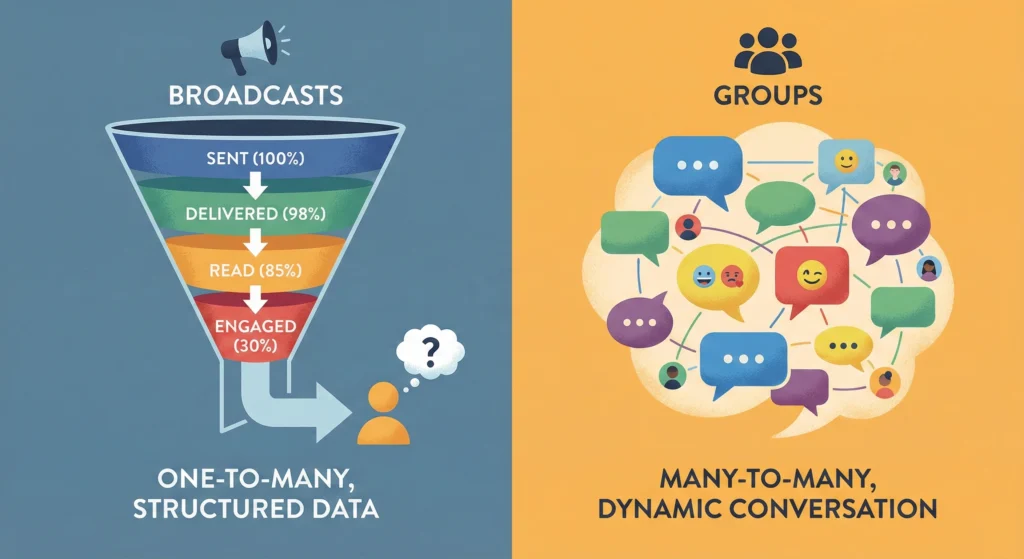
The way WhatsApp handles data depends entirely on privacy rules. Broadcasts are private, one-on-one messages sent to many people at once. Groups are public spaces where everyone sees everyone else. This structure changes what data you can see.
Summary of Reporting Capabilities: Direct vs. Aggregate Data
- Broadcast lists give you direct data. Since the chat happens privately between you and the customer, you can track the specific journey of a single message. You know exactly if Customer A opened the message.
- Groups give you aggregate data. This means you see the total activity of the room, not always individual actions. You might see that a group is busy, but it is harder to track if a specific person read a specific announcement.
The Verdict: Which Channel Offers Actionable ROI Metrics?
If you need to measure Return on Investment (ROI), Broadcast lists are the winner. They allow you to calculate open rates and response rates accurately. This data helps you verify if your marketing budget is bringing in sales. Groups are better for long-term brand building, which is harder to measure in immediate dollars.
WhatsApp Business Broadcast Analytics Metrics
Broadcasts act like an email newsletter but with higher open rates. The analytics focus on the delivery funnel. This shows you where you might be losing customers during the communication process.
Sent, Delivered, and Read Receipts: The Conversion Funnel
The core of broadcast reporting consists of three checkmarks.
- Sent: The message left your phone or software.
- Delivered: The message arrived on the customer’s phone.
- Read: The customer opened the chat (if they have read receipts turned on).
This creates a funnel. If you send 1,000 messages but only 500 are delivered, you have a data quality issue. If 500 are delivered but only 50 are read, you have a content issue.
Calculating Open Rates for High-Volume Broadcasts
To find your Open Rate, you divide the number of “Read” messages by the number of “Delivered” messages.
- Formula: (Read / Delivered) x 100 = Open Rate %.
A high open rate means your headline or first sentence is catchy. Tools like Waplify help automate this calculation, saving you from counting checkmarks manually.
Segmentation Accuracy and Targeting Effectiveness
Data is only useful if you send messages to the right people. Broadcasts allow for segmentation. You can tag customers based on past purchases. If you send a “VIP Offer” to your “VIP Tag” list, the analytics will tell you if that specific group is interested. This precise targeting improves your results significantly.
Limitations of Standard App Broadcast Reporting
The standard WhatsApp Business App has limits. It does not show you a dashboard of trends over time. You have to look at messages one by one. It also does not export data to Excel easily. This makes it hard for growing businesses to track monthly progress without external software.
WhatsApp Group Analytics and Engagement Signals
Groups are different. They are about community. The metrics here are not about sales funnels but about social proof and activity. You are measuring how “alive” your community is.
Qualitative Metrics: Sentiment and Community Interaction
In a group, you look for sentiment. Are people happy? Are they complaining? You also
measure interaction volume.
- How many replies did a post get?
- Are members talking to each other, or just to the admin?
These are qualitative metrics. They describe the quality of the relationship rather than just the number of views.
Admin Logs vs. Member Activity Tracking
Admins can see who is currently in the group and who has left. However, tracking exactly how often a specific member posts requires manual work or advanced bots. You generally look at the group as a whole entity rather than tracking individual members’ daily habits.
The Privacy Barrier: Why Individual Analytics Are Restricted in Groups
WhatsApp protects user privacy strictly. In a group setting, WhatsApp does not provide a report saying, “User A read your message at 2:00 PM.” This is to prevent spam and surveillance in social spaces. This privacy barrier means you cannot treat group members exactly like leads in a database.
Measuring Retention and Churn in Group Settings
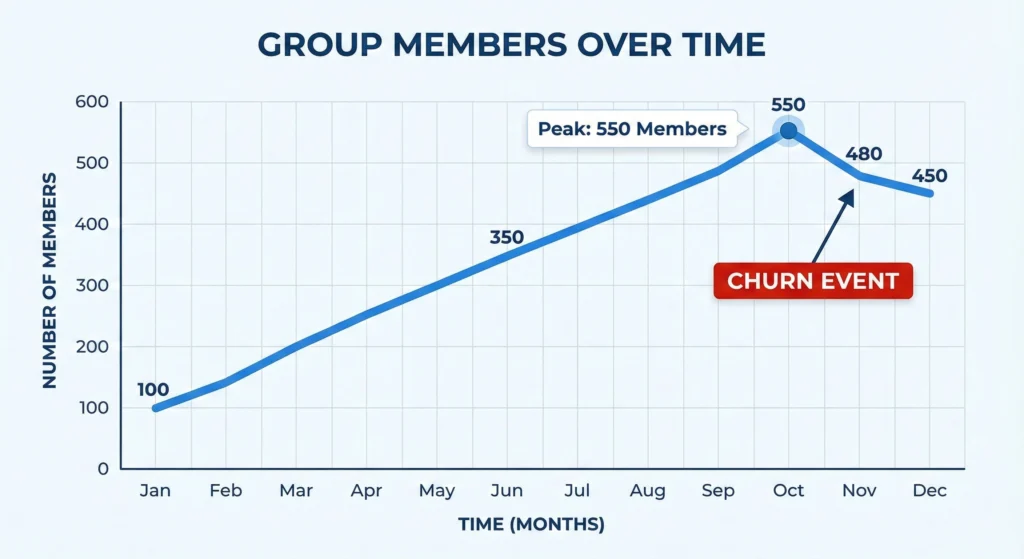
The most important hard number for groups is retention.
- Growth: How many new people joined this month?
- Churn: How many people left the group?
If your churn rate is high, your content might be spammy or irrelevant. Watching the participant count is the best way to judge the health of a group.
Data Fields and Exportable Insights
Comparing the two channels side-by-side helps clarify which one fits your current campaign. Broadcasts are for data lovers; Groups are for community builders.
Metric Availability by Channel Type
| Feature / Metric | Broadcast Lists | WhatsApp Groups |
| Privacy Type | 1-to-1 (Private) | Many-to-Many (Public) |
| Read Receipts | Individual Tracking | Aggregated (Hard to track individually) |
| Delivery Rates | Exact per user | Post success only |
| Reply Tracking | Direct 1-on-1 Chat | Public Thread or Reply |
| User Privacy | High (User sees only you) | Low (User sees other numbers) |
| Best For | Sales, Promos, Alerts | Support, Community, Feedback |
| Data Export | Available via API Tools | Limited / Manual |
Visualizing the Data: Dashboard Examples for Broadcasts vs. Groups
Imagine two dashboards.
- Broadcast Dashboard: Shows bar charts of Sent vs. Read. It looks like an email
marketing report. - Group Dashboard: Shows a timeline of activity spikes. It looks like a social media
engagement report.
Privacy Compliance and Its Impact on Reporting Depth
You must respect data laws like GDPR. Because Broadcasts are consensual 1-on-1 chats, they are often safer for sending marketing data. Groups expose phone numbers to other members. This limits how much “spying” or detailed reporting tools are allowed to do within groups to remain compliant.
Interpreting Performance Data for ROI
Numbers mean nothing without context. To get ROI (Return on Investment), you must connect the data to money made or time saved.
Benchmarking Conversion Rates: Broadcast vs. Group Interaction
- Broadcast Benchmark: A good open rate is often over 80%. A response rate of 10-20% is excellent.
- Group Benchmark: Active participation of 5-10% of the total group size is considered healthy.
If your numbers are lower than this, you need to change your message or your offer.
Industry-Specific Performance Standards
Different businesses see different results. E-commerce stores usually get better ROI from Broadcasts (flash sales). Consultants or coaches often see better retention in Groups (peer support). To see how your sector stacks up, checking resources on Industry benchmarks can help you set realistic goals.
Case Study: Data-Driven Decision Making in Retail vs. Service Sectors
- Retail Example: A shoe store sends a Broadcast coupon. They track that 500 people read it and 50 people used the code. They know exactly how much money they made.
- Service Example: A gym runs a “Fitness Challenge” Group. They cannot track every view. But they notice that members who stay in the group renew their gym membership 30% more often. The ROI here comes from retention, not immediate clicks.
Overcoming Reporting Limitations with Advanced Tools
If the standard WhatsApp app is not giving you enough data, you need third-party tools. These tools connect to WhatsApp to pull out better insights.
Leveraging Waplify Features for Granular Analytics
Standard apps stop at “read receipts.” Advanced platforms go deeper. By using powerful Features found in specialized software, you can tag customers automatically when they reply. You can also see which specific links they clicked. This turns WhatsApp into a full marketing machine.
Automating Data Exports and CRM Integration
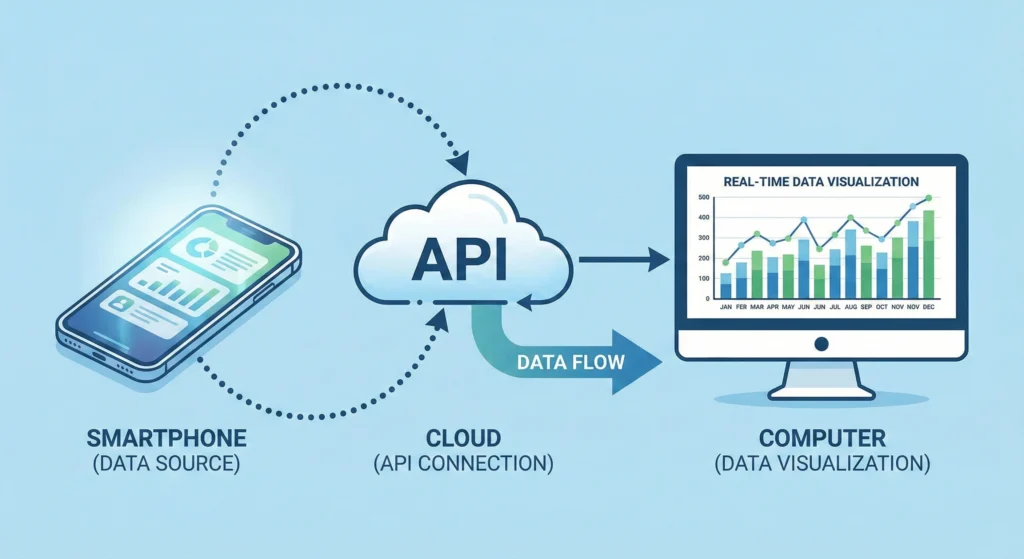
You should not have to copy-paste numbers. Good tools allow you to export data automatically. You can send your WhatsApp stats directly to your CRM (Customer Relationship Management) system. This puts your WhatsApp data right next to your email and ad data.
Using API Solutions to Unlock Advanced Engagement Metrics
For the deepest data, businesses use the WhatsApp Business API. This allows for:
- Chatbots that track user paths.
- Automated labeling of conversations.
- Exact timestamps for every interaction.
This level of detail is necessary for large teams or high-volume senders.
Best Practices for WhatsApp Data Analysis
- Define Your Goal: Use Broadcasts for sales. Use Groups for loyalty.
- Clean Your Data: Remove numbers that do not receive messages (failed delivery) to keep your stats accurate.
- Respect Privacy: Do not try to track group members too aggressively. It damages trust.
- Use Tags: Segment your audience so you can compare how different groups of people perform.
- Automate: Use software to track numbers so you can focus on writing good messages.
Choosing the Right Channel for Measurable Growth
The choice between Broadcasts and Groups comes down to what you need to measure. If you need hard numbers to prove to your boss that marketing is working, use Broadcasts. The funnel is clear and trackable. If you want to build a brand vibe and keep customers around longer, use Groups.
Most successful businesses use a mix of both. They use Broadcasts to drive sales and Groups to nurture fans. By using the right tools and understanding the data limits of each, you can turn WhatsApp into your most powerful growth channel.