
If you use WhatsApp every day (and honestly, most people do), then you already have a pretty decent Grocery Shopping on WhatsApp ordering tool sitting in your hand. No new app. No new login. No weird setup or anything. You just message the store, ask for what you need, and that’s it, you get your stuff. It almost sounds a bit too simple, like it shouldn’t actually work, but it’s real. And it’s growing really fast.
Why grocery shopping on WhatsApp is suddenly everywhere
WhatsApp grocery shopping isn’t a brand new idea. It’s just now easy and convenient enough for regular people to actually use it.
The main reason is pretty simple: you already open WhatsApp daily, so ordering groceries there removes that annoying “ugh I have to download a new app and figure it out” kind of friction.
And a few things have changed recently:
- More stores switched to WhatsApp Business, which lets them look like a real business with a profile, hours, address and all that.
- A lot of them now use Catalogs, so you can scroll and browse items right inside the chat.
- Some send payment links, or let you pay on delivery, or use whatever local payment methods people are used to.
- Delivery coordination is smoother now. Quick “I’m outside” messages. Live location only if you actually need it. That kind of small but helpful stuff.
Who this is best for:
- Busy families who just want groceries handled without thinking too much about it every time.
- Seniors who are comfortable with WhatsApp but really don’t want to deal with grocery apps.
- Anyone who likes local neighborhood shops or small supermarkets instead of giant chains.
- People who do the same weekly orders and don’t want to rebuild a whole cart again and again.
Just to set expectations a bit: if the store is set up properly, you can usually place your first order in a few minutes. Not hours. It shouldn’t turn into some whole Sunday afternoon project.
How Grocery Shopping on WhatsApp actually works (simple breakdown)
Most stores follow some version of this flow:
- Find a store WhatsApp number
- Message “Hi” or “Order”
- Browse their catalog or send your item list
- Confirm substitutions (important)
- Pay
- Get delivery or pick up
Two common setups you’ll see:
1) Chat based ordering with a human
You message the store. A staff member replies. You send your list. They confirm availability and price. You pay. They deliver.
This is super common with smaller local stores. It feels like texting a helpful shopkeeper.
2) WhatsApp Catalog + quick replies + semi automation
You tap into a catalog, add items, and the store uses quick replies like:
- “Please share address”
- “Choose delivery slot”
- “Confirm substitutions: yes/no”
Not always fully automated, but faster and more structured.
What you should have ready before you start
- Delivery address (with landmarks if your area is confusing)
- Preferred time window (example: 6 to 8 pm)
- Payment method (cash, card on delivery, bank transfer, UPI, payment link, etc)
What to screenshot or save once (so you stop asking later)
- Store hours
- Delivery fee and minimum order value
- Ordering cut off time (if they have one)
- Substitution policy
You can literally star these messages or screenshot them. Future you will be grateful.
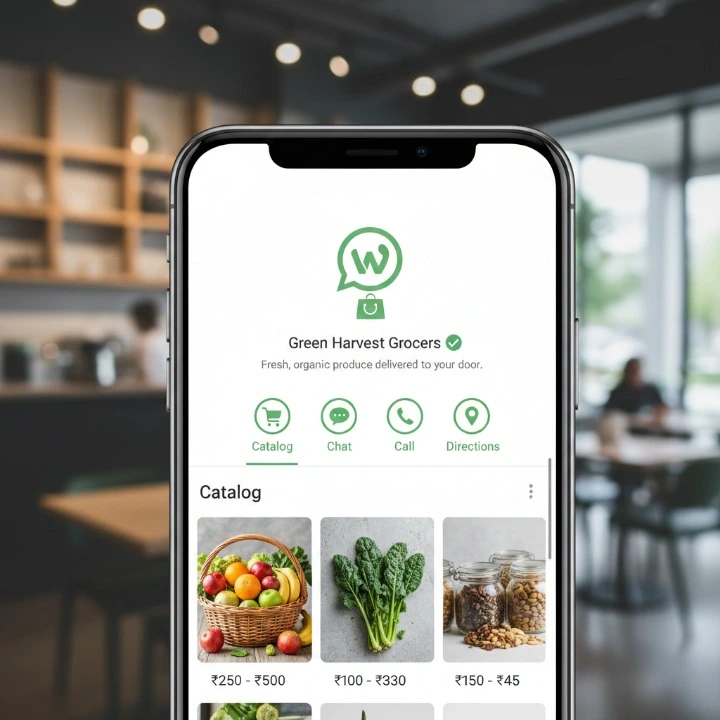
Start in 5 minutes: step by step first order
This is the “don’t overthink it” version.
Step 1 (1 minute): Find a legit WhatsApp grocery number
Best sources:
- Store website (Contact page)
- Google Maps listing (their Google Business profile)
- Instagram bio (many local stores put it right there)
- In store board or receipt footer
- Friends and neighbors (honestly one of the best ways)
If you can’t find the number on a public business page, pause. Don’t rush into random numbers.
Step 2 (30 seconds): Send the right first message
Copy pastes this (and edit the brackets):
First message template (fastest way to get a clean reply):
Hi! I’d like to place a grocery order. Is this the right WhatsApp number for orders?
Most stores will reply with either the catalog link, ordering format, or a “yes send your list”.
Step 3 (3 minutes): Send your list and delivery details in one clean block
Do not send 15 separate messages like: “milk”
- “also bread”
- “wait eggs”
- “2 eggs”
- “no 12 eggs”
You’ll confuse the person, and you’ll confuse yourself later.
Use the templates below.
Template C: “Send today’s offers or catalog”
Hi, can you please share today’s offers and your WhatsApp catalogue (if available)?
Template D: Substitution instruction (use one)
If something is out of stock, please replace with the best alternative under $[X]. No premium upgrades.
or
If out of stock, same brand only. If not available, skip and tell me.
or
Please call/message before substituting anything.
Template E: Pickup order version
Hi! I want to place a pickup order from your [Branch/Location]. I’ll arrive around [time]. Please confirm total and pickup name/number.
Copy-paste message templates that get faster confirmations
These are the ones I’d actually keep saved in a Notes app. You can reuse them forever.
Template A: First time order (most complete)
Hi! First time ordering.
Delivery address: [full address + landmark]
Preferred delivery time: [time window]
Payment: [cash/card on delivery/payment link/transfer]
Substitutions: [any brand ok / same brand only / ask before substituting]
Items:
- [Item] | [Brand] | [Size] | Qty [ ]
- [Item] | [Brand] | [Size] | Qty [ ]
- [Item] | [Brand] | [Size] | Qty [ ]
Please share itemized total (items + delivery fee + any service fee/tax) before I confirm. Thanks!
Template B: Weekly reorder (short)
Reorder for this week please. Delivery [day], [time window]. Same address as last time.
Items:
1.
2.
Substitutions: same as usual. Please send itemized total.
Template C: Offers/catalog request
Can you send today’s offers and your catalog link please?
Template D: Substitutions rule (pick one)
Replace with best alternative under $[X], otherwise skip.
or
Same brand only. If unavailable, skip and tell me.
Template E: Pickup version
Pickup order please from [Location]. I’ll be there around [time].
Items:
Substitutions: [rule].
Please send itemized total and pickup instructions.
Finding the right WhatsApp grocery store (and avoiding scams)
This matters. Because WhatsApp is personal by design, and scammers love that.
Where to find reliable sellers
- Official store website
- Verified social pages (Instagram/Facebook with consistent branding)
- Google Maps listing (address, reviews, photos)
- Local chains’ customer support numbers
- Community groups where people tag the same store repeatedly
Red flags to watch for
- A personal number with no store identity. No name, no address, no branding.
- Pressure to prepay to a personal account name that doesn’t match the store.
- They won’t send an itemized summary. Just “send money and we deliver”.
- Vague delivery promises like “sometime today” with no window.
- Impersonation threats are real on WhatsApp. Be cautious of accounts pretending to be your trusted stores.
Quick verification checklist
Before you send money, check you have:
- Business name and logo on WhatsApp profile
- Store address (real one)
- Clear payment instructions
- Return/refund policy, even if basic
- An itemized invoice or order summary in chat
If you’re ordering from a local independent store, ask once:
Can you share a photo of the storefront or a receipt header with the shop name?
Then save it. After that, you’re not re-verifying every week.
What to send so your order doesn’t get messed up
Most WhatsApp grocery mistakes happen because the order message is vague.
Use this structure:
Item — brand — size — quantity
Example list you can copy:
- Rice | Any | 5 kg | Qty 1 (cheapest)
- Milk | Brand: Amul | 1 L | Qty 2
- Eggs | Any | 12 pack | Qty 1
- Bread | Whole wheat | 400 to 500 g | Qty 1
- Chicken breast | Fresh | 500 to 700 g | Qty 1
Be painfully clear about substitutions
Pick one:
- “Any brand ok”
- “Same brand only”
- “Ask before substituting”
- “Skip if unavailable”
If you care about budget, say it early:
- “For staples, please choose the cheapest option.”
- “Do not upgrade to premium brands unless I confirm.”
Produce tips (this is where things get weird if you don’t specify)
Add quick notes like:
- Bananas: slightly green, not fully ripe
- Tomatoes: medium firm, not too soft
- Potatoes: no sprouts
- Apples: 1 kg, sweet variety if available
- Weight range: “500 to 700 g is fine”
If you have allergies or dietary rules, put it at the top:
Allergy: peanuts. Please avoid items processed with peanuts.
Not at the bottom after 30 lines of items. People miss it.
Payments, receipts, and delivery: what usually happens
Payment options vary a lot by store and region, but you’ll usually see:
- Pay on delivery (cash)
- Card on delivery (if they have a machine)
- Payment links
- Bank transfer or UPI (region specific)
- In app payments where WhatsApp supports it (not everywhere)
Best practice, every time:
Please send an itemized order summary + total before I confirm/payment.
Your itemized total should include:
- Item prices
- Delivery fee
- Service fee (if any)
- Taxes (if applicable)
Receipts
Ask for one of these:
- Digital receipt
- Photo of printed receipt
- Screenshot of invoice
This helps with missing items, wrong charges, returns. And it keeps the chat “clean” if you ever need to scroll back.
Delivery coordination
- Confirm drop off instructions: leave at door vs handover
- Share live location only when needed (like when a driver can’t find you)
- If it’s an apartment: gate code, floor, calling instructions
Tipping and delivery etiquette
Keep it simple and normal:
- Be reachable during the delivery window
- If you tip, do it consistently and fairly, based on local norms
- If there’s a problem, don’t explode at the delivery person. Fix it with the store calmly, with the receipt and chat history
Pros and cons vs grocery apps (honest comparison)
WhatsApp is not “better than apps” in every way. It’s just better in specific situations.
Pros
- No app learning curve
- Human help (good for substitutions and special requests)
- Works well with local stores
- Faster clarifications: “Do you have the 1L or 500ml?”
- Great for repeat weekly orders
Cons
- Pricing and availability can be less visible upfront
- More manual (you’re typing a list)
- Depends on business hours and response time
- Record keeping can get messy if you don’t ask for itemized summaries
When apps win
- Huge catalogs
- Instant price comparison
- Better tracking and ETAs
- Loyalty points, coupons, auto discounts
When WhatsApp wins
- Seniors or less tech savvy users
- Custom bundles (like “weekly veggie mix for 4 people”)
- Local produce and butcher orders
- Reorders where you just paste the same list every week
Make it effortless: set up your weekly WhatsApp grocery routine
Once the first order works, you can turn it into a routine that takes… two minutes.
- Pin the chat with your grocery store.
- Save two notes on your phone:
- “Staples” (rarely changes)
- “Fresh” (changes weekly)
- Ask the store to save your profile:
- Address
- Usual brands
- Substitution rules
- Preferred delivery slot
Use WhatsApp features:
- Star common item messages (so you can copy them later)
- Create a family group for approvals if needed (“yes add snacks”, “no skip soda”)
- Keep orders in one message block, not a drip feed
A simple rhythm that works:
- Night before: send list
- Morning: confirm totals and substitutions
- Fixed window delivery: same time each week
Less thinking. More groceries showing up on time.
Common issues (and quick fixes) people run into
Out of stock items
Fix: define substitution rules and ask for 2 alternatives.
If out of stock, suggest 2 alternatives with prices.
Slow replies
Fix: order earlier, ask cut off times, keep your message as one block.
What is your daily ordering cut off time for same day delivery?
Wrong items or quantities
Fix: insist on itemized confirmation. Only reply “CONFIRMED” after checking. This sounds small, but it prevents so many mistakes.
Freshness concerns
Fix: specify ripeness and expiry minimums.
Dairy: minimum 5 days to expiry please.
For high value items:
Please share a quick photo before dispatch (only for [item]).
Delivery delays
Fix: ask for an ETA range, not a single exact minute.
Please share ETA range once it’s out for delivery (example: 30 to 45 mins).
Have a backup pickup plan if it’s urgent.
The bottom line: you can place your first WhatsApp grocery order today
The 5 minute setup is basically:
Find a legit store number → send the template → send a structured list → confirm substitutions + total → pay → delivery/pickup.
Best starting tip: keep your first order small. A few staples, a few fresh items. Learn how the store communicates. Then scale it into your weekly routine.
Here’s the first time template again. Paste it, edit it, send it.
Hi! First time ordering.
Delivery address: [full address + landmark]
Preferred delivery time: [time window]
Payment: [cash/card on delivery/payment link/transfer]
Substitutions: [any brand ok / same brand only / ask before substituting]
Items:
- [Item] | [Brand] | [Size] | Qty [ ]
- [Item] | [Brand] | [Size] | Qty [ ]
Please share itemized total (items + delivery fee + any service fee/tax) before I confirm. Thanks!
Then save the chat. Pin it. And congrats, you now have the easiest reorder system ever. Slightly boring. Very effective.
FAQ: Grocery shopping on WhatsApp
Is it safe to order groceries on WhatsApp?
It can be, yeah, but you gotta be a bit careful. Try to order from a verified business and always ask them for an itemized summary before you send any money. Like a clear list of what you’re paying for. And avoid sending money to personal accounts unless you really trust the store and can actually verify who they are.
Do I need WhatsApp Business to order?
No, you don’t. Customers just use regular WhatsApp. The stores are usually the ones using WhatsApp Business, not you.
What if the store doesn’t have a catalog?
That’s totally normal, honestly. A lot of places don’t. Just send them a structured list yourself with the item, brand, size, quantity, and any clear substitution rules you want. It doesn’t have to be perfect, just clear enough.
How do I avoid getting the wrong items?
Try sending your order in one clean message instead of a bunch of little ones. Then ask them to send an itemized confirmation. Only say yes and confirm after you carefully check the summary and make sure it matches what you wanted.
Should I pay before delivery?
It really depends on the store. Some ask for payment first, some don’t. If you do pay before, only do it after you get an itemized total and payment instructions that clearly match the store identity, like name, number, stuff like that.
What’s the best way to handle substitutions?
Make your rule clear right from the start. For example you can say things like “Any brand ok”, “same brand only”, “under $X”, or “ask before substituting”. Put that near the top of your message so they see it early and don’t have to guess.
Can I do pickup orders through WhatsApp?
Yes, you definitely can. Just use a pickup style message with your location, ETA, and a request for an itemized total and pickup instructions. That way you know where to go and what you’re paying.
What should I do if something is missing or damaged?
Reply in the same chat and send the receipt or a photo, plus a clear list of what’s missing or damaged. Most stores fix it faster when they can see the order summary and the receipt right there in the same conversation.
FAQs (Frequently Asked Questions)
Why is grocery shopping on WhatsApp becoming so popular lately?
Grocery shopping on WhatsApp is getting really popular lately because, honestly, almost everyone already uses WhatsApp every day. So you don’t have to download some new app or sign up somewhere again. It just fits into what people already do.
Also, more local stores are starting to use WhatsApp Business features like catalogs, payment links and delivery coordination. So the whole thing feels smoother and kinda easy to manage. It’s especially handy for busy families, seniors, and people who like shopping from their local neighborhood stores instead of big apps.
How does ordering groceries via WhatsApp actually work?
So, the basic way it works is pretty simple. First, you find the store’s WhatsApp number, usually from their website or social media or maybe a flyer. Then you send them a message like “Hi” or “Order” to start.
After that, you either browse their catalog if they have one, or you just type out your list. Sometimes they ask about substitutions if something is out of stock, and you confirm what’s okay. Then you pay using whatever payment methods they support, and finally you set up delivery or pickup.
You might be talking to a real person, or sometimes it’s automated stuff using WhatsApp Catalog and quick replies. You should have your delivery address ready, your preferred time window, and your payment method so you’re not scrambling at the last minute.
What are the step-by-step instructions to place my first grocery order on WhatsApp?
Step 1: Find a real, legitimate WhatsApp grocery number. Check the store’s official website or their social profiles, not random forwards.
Step 2: Send the correct first message. A lot of stores give a starting word or template like “Hi, I want to order groceries” that helps them process faster.
Step 3: Share your grocery list clearly. Include the brand, size, quantity, and what kind of substitutions are okay.
Step 4: Confirm delivery details like your full address, nearby landmarks, and your preferred time slot so they don’t show up when you’re not home.
Step 5: Confirm your payment method and ask for an order summary before you pay.
You can even use copy paste message templates for your usual items, which kinda speeds things up once you get used to it.
How can I find reliable WhatsApp grocery stores and avoid scams?
Try to stick with verified sellers that you can find through official websites, verified social media pages, Google Maps listings, local chain customer support numbers, or trusted community groups.
Be careful with random personal numbers that don’t show any proper store identity. Red flags are stuff like people pushing you to prepay to a personal account, no itemized summary, or super vague delivery promises.
Make sure you check the business name or logo, address, return or refund policy, and that the payment instructions are clear. Ask for an itemized invoice or bill.
If it’s a local store, you can also ask them once for a photo of their storefront board, business card, or a proper receipt and then just save that for future orders.
What information should I send in my WhatsApp grocery order to avoid mistakes?
Try to send a neat, structured list like:
Item — brand — size — quantity
For example: “Brand X milk – 1L – 2 units”.
Be really clear about substitutions. Say things like “any brand ok” or “same brand only” so they don’t guess. You can also share your budget preferences, like “cheapest option” for basic staples.
For fruits and veggies, mention stuff like how ripe you want it or the weight range. And if you have any allergies or dietary restrictions, put those right at the top of your message so they see it before picking items.
What are the typical payment methods and delivery practices when ordering groceries on WhatsApp?
Most of the time, the payment options include pay on delivery with cash or card, payment links sent right in the chat, UPI or bank transfers depending on your region, and sometimes in-app payments where WhatsApp supports that.
Always ask for an itemized order summary first. That should list the items, delivery fees, service fees, and taxes before you send any money. Also, request a digital receipt or at least a clear photo of the bill, so you have proof in case of returns or missing items.
For delivery, confirm how you want the drop off to happen. Like if they should leave it at the door, hand it over directly, or give you a call. Share your live location only when it’s really needed and with trusted stores.