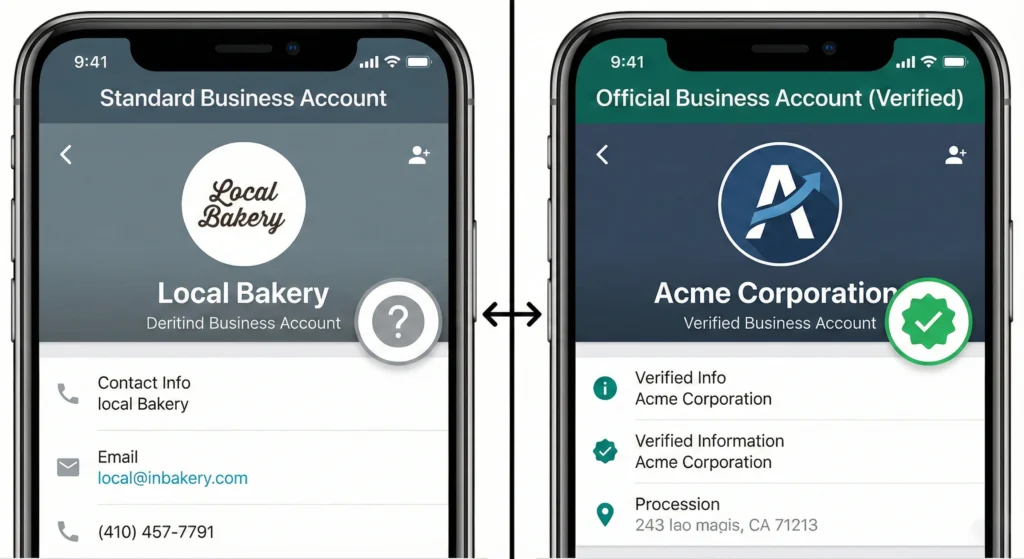
The WhatsApp Green Tick is an Official Business Account (OBA) badge that verifies a brand is authentic and notable. This badge appears next to the business name in chat threads and profile views. It proves to customers that they are talking to the real company, not a fake account. In 2026, obtaining this badge requires using the WhatsApp Business API, proving high brand awareness through press coverage, and maintaining a healthy messaging quality score.
The Currency of Trust in Conversational Marketing
Trust is the most important part of sales. When a customer sees an unknown number message them, they often hesitate. They might think it is spam or a scam. However, when they see a verified badge, that fear goes away.
The Green Tick does more than just look good. It signals legitimacy. For growing businesses, this symbol helps increase open rates and customer replies. It turns a simple text message into a branded experience. To get this level of trust, businesses must move away from the standard app and use advanced tools like Waplify This software connects you to the API, which is the first requirement for verification.
How to Get the WhatsApp Green Tick in 2026 (The Short Answer)
Getting the badge is not automatic. You cannot simply pay a fee to get the Official Business Account status instantly. It is a rigorous process managed by Meta (the owner of WhatsApp) to ensure only top-tier brands get verified.
To get verified, you must demonstrate that your business is well-known and follows strict rules. You need to be “notable.” This means people search for your brand often, and you appear in news articles.
Official Business Account (OBA) vs. Meta Verified
It is important not to confuse the two types of verification.
- Official Business Account (OBA): This is the traditional “Green Tick” for API users. It is free to apply for, but hard to get. It relies on brand fame.
- Meta Verified: This is a paid monthly subscription for small businesses using the WhatsApp Business App. It gives you a badge, but it does not give you the advanced automation features of the API.
The 2026 Rebrand: Understanding the Shift from Green Tick to Blue Badge
You should know that the “Green Tick” is changing color. To make all its apps look the same, Meta is slowly changing the WhatsApp badge to a Blue Checkmark. This matches the badges on Instagram and Facebook. Even though the color is changing, the rules for getting the Official Business Account remain the same.
Minimum Requirements for Approval
Before you apply, make sure you have these four things ready:
- WhatsApp Business API Access: You cannot get an OBA on the free mobile app.
- Facebook Business Verification: Your business details must be verified in the Meta Business Suite.
- Two-Step Authentication: This must be turned on for security.
- Tier 2 Messaging Level: You usually need to be sending at least 1,000 messages a day successfully
Detailed Eligibility Requirements for WhatsApp Official Business Accounts
Meeting the basic technical rules is just the start. Meta reviews every application manually. They look at specific criteria to decide if a business deserves the badge.
The most common reason for rejection is a lack of “notability.” Even if you are a big company, if you are not in the news or search results, Meta might say no.
The ‘Notability’ Factor: Press Coverage and Brand Presence Criteria
“Notability” is the hardest requirement. Meta searches for your brand in online news. They look for articles in large publications.
- What counts: News sites, magazines, and newspapers.
- What does NOT count: Paid advertisements, press releases you wrote yourself, or your own website.
Business Verification Status in Meta Business Suite
Your business must be real. You need to upload legal documents to the Meta Business Suite. This proves your legal name, address, and phone number. If your business is not verified by Facebook first, your WhatsApp request will be rejected immediately.
Messaging Quality Rating and Policy Compliance
Your behavior matters. WhatsApp gives every phone number a quality rating: Green (High), Yellow (Medium), or Red (Low). If you spam people or if users block you, your score drops. You need a High-Quality rating to be eligible for the badge.
The Importance of Reaching Tier 2 Messaging Limits
Meta rarely verifies brands that do not send many messages. You need to show you are an active sender. This usually means reaching Tier 2.
- Tier 1: 1,000 messages per 24 hours.
- Tier 2: 10,000 messages per 24 hours.
Once you scale your traffic to this level, Meta takes your application more seriously.

The WhatsApp Business Green Tick Application Process
Applying for the badge is a structured process. You must follow the steps in the correct order to avoid delays.
The entire process usually takes a few weeks. Most of that time is spent gathering your press links and waiting for Meta to review your case.
Step 1: Securing WhatsApp API Access with Waplify
You cannot apply for the Official Business Account using the regular WhatsApp app on your phone. You must use the WhatsApp Business API. The API has no interface, so you need a provider.
Action: Sign up for an API provider.
Tip: Check out Waplify’s Plans & Pricing to get connected quickly without high monthly fees.
Step 2: Completing Facebook Business Verification
Log into your Meta Business Suite. Go to “Security Center” and start verification.
- Upload your business license.
- Upload a utility bill to prove your address.
- Confirm your phone number via SMS or call.
Step 3: Submitting the Request via WhatsApp Manager
Once you have the API and Business Verification:
- Go to WhatsApp Manager.
- Select the phone number you want to verify.
- Click on “Profile.”
- Click “Submit Request” for the Official Business Account.
- Fill in the form with up to 5 links to news articles about your brand.
Step 4: Handling Rejections and Appeal Timelines
If you get rejected, do not panic. It is very common.
- Wait Time: You must wait 30 days before applying again.
- Strategy: Use that month to get more press coverage. Do not just submit the same links again
How to Build ‘Notability’ for Approval
If you are not famous yet, you can build your fame. You need a strategy to get your brand name into the news.
Focus on organic growth and public relations. Meta wants to see that other people are talking about you.
High-Authority Press Release Angles and Templates
To get coverage, pitch stories that news outlets want to publish.
- Funding News: Did you raise capital?
- Product Launches: Are you releasing something new?
- Social Impact: Is your company helping the community?
- Partnerships: Are you working with another big brand?
SEO Signals: Wikipedia, Google Knowledge Panels, and Backlinks
A strong Google presence helps. When Meta staff search for you, they should see a Google Knowledge Panel on the right side of the search results. Having a Wikipedia page is also a very strong signal of notability.
Aligning Display Names Across Social Channels
Your brand name must look the same everywhere. If your WhatsApp name is “Joey’s Pizza” but your Instagram is “Joeys Pizza NYC,” it causes confusion. Ensure your display name is identical on Facebook, Instagram, and WhatsApp.
Official Business Account (API) vs. Meta Verified Subscription
There are two ways to get a checkmark. For growing brands, the API path is usually better because of the automation features.
Below is a comparison to help you choose the right path.
| Feature | Official Business Account (OBA) | Meta Verified Subscription |
| Platform | WhatsApp Business API | WhatsApp Business App |
| Badge Type | Green Tick (shifting to Blue) | Blue Badge |
| Cost | Free (Approval based on fame) | Monthly Subscription Fee |
| Requirement | High Notability (Press) | Payment + Identity Check |
| Mass Messaging | Yes (Unlimited scaling) | Limited (Broadcast lists) |
| Chatbots | Yes (Advanced flows) | No |
| Multi-Agent | Yes (Unlimited users) | Limited (Up to 4 devices) |
API Capabilities vs. App Features
The OBA is for the API. The API allows you to connect software to send thousands of messages at once. It also lets you build chatbots. The Meta Verified subscription is for the simple mobile app, which cannot handle high volumes of customer support.
Free OBA Verification vs. Monthly Subscriptions
The OBA badge itself costs $0. However, you must pay for API conversations. The Meta Verified subscription costs a flat monthly fee (around $14/month), but it limits your growth.
Why Scaling Brands Choose Waplify Plans & Pricing for API Access
Brands that want to grow need the API. It allows for team inbox and automated marketing. To see the specific tools available for scaling, look at Features. This explains how automation pairs with verification to drive sales.
Best Practices for Maintaining Your Badge
Getting the badge is hard but keeping it requires care. You can lose your badge if you break the rules.
Meta constantly monitors verified accounts. If your quality score drops too low, they will revoke your verification.
Avoiding Spam Flags and Maintaining Quality Scores
Do not send messages to people who did not agree to receive them.
- Opt-in: Always get permission first.
- Relevance: Send content that is useful.
- Frequency: Do not message every day unless the customer expects it.
Leveraging Verified Status for Higher Open Rates
Once you have the tick, use it. Mention in your email marketing that you are now verified on WhatsApp. This encourages people to save your number. Verified numbers often see a 30% higher open rate on marketing broadcasts.
Using Waplify Features to Automate Verified Interactions
You can use software to make your verified account work 24/7. Set up automated welcome messages and support bots. Different sectors use this differently. For examples on how your specific field can use this, check the industry page.
Common Reasons for Green Tick Rejection
Most rejections happen for three reasons. Knowing them helps you avoid them.
Inconsistent Brand Display Names
Your WhatsApp Display Name must match your legal business name or your public brand name exactly. Minor spelling differences can cause a rejection.
Lack of Organic Media Presence (Paid Articles Don’t Count)
This is the number one reason for failure. Meta ignores paid press releases (like PR Newswire). They want to see articles from TechCrunch, Forbes, or local major newspapers that were written by journalists, not you.
Violation of WhatsApp Commerce Policies
You cannot sell illegal items, weapons, tobacco, or adult products. If your business sells prohibited goods, you will never get verified.
Maximizing Your Verification Odds in 2026
- Switch to API: You must be on the WhatsApp API platform.
- Get Famous: Focus on PR and news coverage before applying.
- Be Consistent: Match your name across all social media.
- Stay Clean: Keep your messaging quality high and avoid spam.
- Be Patient: If rejected, wait 30 days and improve your press links.
Beyond the Badge – Delivering Verified Value
The Green Tick (or Blue Badge) is a powerful tool. It builds instant trust. However, a badge alone does not keep customers happy. You must combine that trust with great service. Use the verification to get their attention but use excellent content and fast support to keep their loyalty.
By following this guide, you are ready to apply for the Official Business Account. Focus on building your brand’s reputation, and the badge will follow.