
The Ultimate WhatsApp Business API Compliance Checklist: 2025 Edition to Avoid Bans
The 2025 standard for WhatsApp compliance relies on the 3-Pillar Rule: securing verifiable opt-in consent, maintaining strict template integrity, and keeping a High-Quality Score. Violating these new, stricter guidelines results in immediate tier downgrades or permanent account bans. To protect your business, you must treat compliance as a core part of your revenue strategy, not just a technical requirement
The Rising Cost of Non-Compliance in the 2025 WhatsApp Ecosystem
WhatsApp is no longer the "Wild West" of marketing. In 2025, Meta uses advanced AI to scan every message sent through the Business API. If you break the rules, you lose your number. This means you lose your customers immediately.
The cost of getting banned is high. You lose revenue while your account is down. You also lose trust with your audience. Recovery takes time and effort. It is much cheaper to follow the rules from day one than to try and fix a banned account later.
Why API Bans Are More Frequent in 2025
Meta has updated its spam detection systems this year. They are faster and smarter than before. In the past, you might have gotten away with sending a few unsolicited messages. Today, the system spots these instantly.
The system looks for specific triggers. Sudden spikes in message volume can trigger a ban. Low read rates or high block rates are also major red flags. If users report your message as spam, the algorithm acts fast to restrict your access.
Compliance as a Revenue Protection Strategy with Waplify
Many businesses view compliance rules as obstacles. However, you should view them as safety rails. A compliant account is a stable account. Stability leads to consistent sales and long-term growth.
Using the right tools makes this easier. By using Waplify you can automate many of these safety checks. This helps ensure your campaigns land in the inbox, not the block list.
The 2025 Compliance Standard
To stay safe in 2025, you must focus on three main areas. These form the foundation of a healthy WhatsApp account. If you ignore one, the structure falls apart.
The 3-Pillar Rule: Explicit Opt-In, Template Integrity, and Quality Score
- Explicit Opt-In: You must have proof that a user asked to receive messages. You cannot buy lists or scrape numbers.
- Template Integrity: Your message content must match the category you selected (Marketing, Utility, or Authentication).
- Quality Score: This is a grade Meta gives your phone number. It is based on how users react to your messages.
What Constitutes a 'Policy Violation' Under New Guidelines
A policy violation is any action that lowers the user experience. In 2025, this is strictly defined. It is not just about sending illegal content.
If you send a message that a user did not expect, that is a violation. If you send too many messages in one day without warming up your number, that is a violation. Meta prioritizes user feedback. If users block you, Meta assumes you are violating policy.
Critical Policy Updates 2025: What Changed?
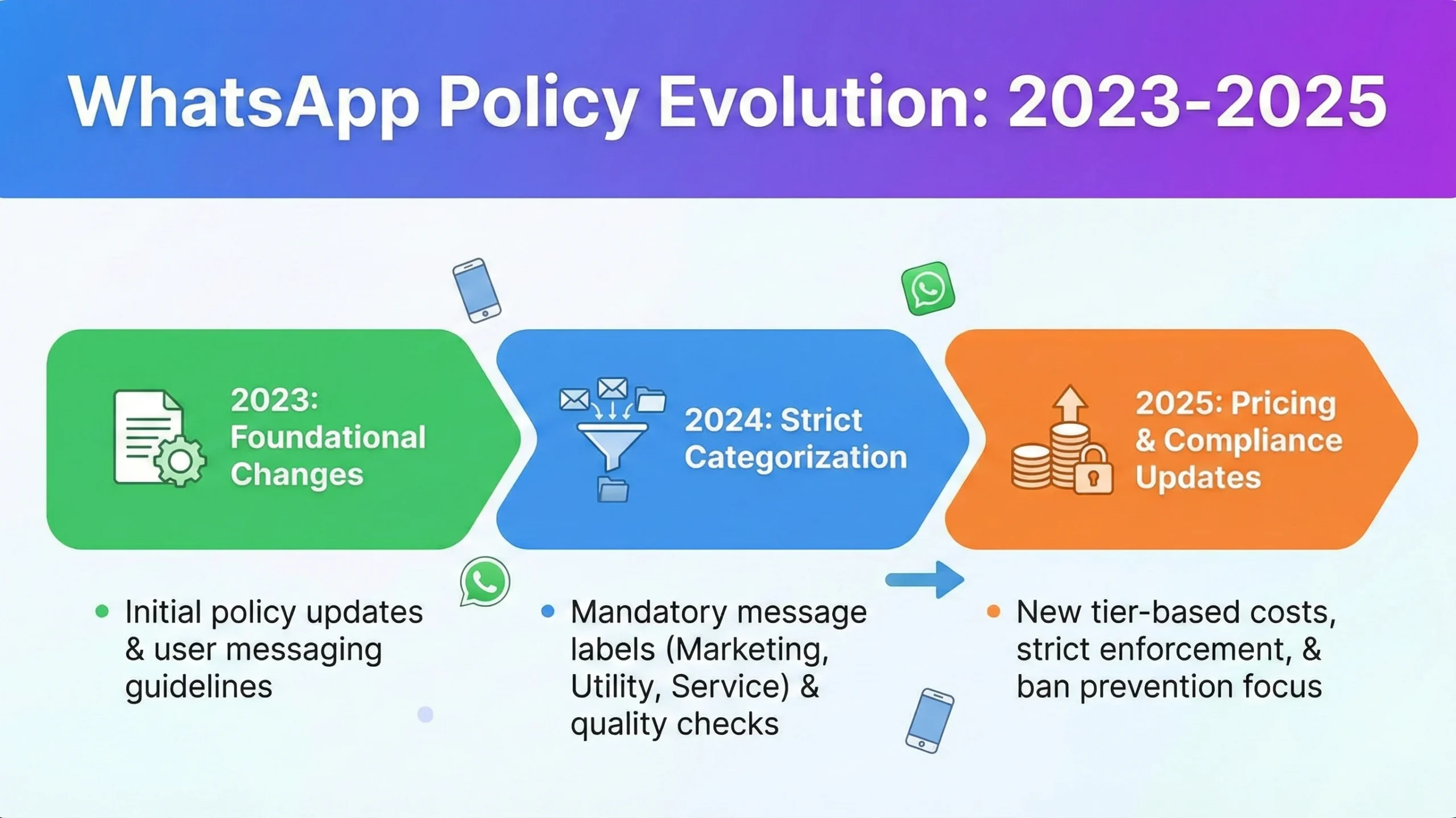
The rules have shifted significantly this year. Meta is now very strict about how you categorize your message templates. They are also watching your spending patterns closely.
Automatic Template Re-categorization Risks
Starting in July 2025, Meta began using AI to check your templates. If you label a message as "Utility" but it contains a sales pitch, Meta will change it to "Marketing."
This happens automatically. You might not even notice until you see your bill. This protects users from receiving spam disguised as order updates. You must be honest about the intent of every template you submit.
Utility vs. Marketing: Navigating Strict Categorization Enforcement
Utility messages are for updates, like receipts or shipping notifications. Marketing messages are for offers, coupons, or new product launches.
The line is now very clear. If a shipping update includes a coupon code, it is now considered Marketing. Mixing these categories is a common reason for template rejection. Keep your transactional messages purely transactional.
New Per-Message Pricing Implications for Compliance
Compliance now affects your wallet directly. Marketing messages cost more than Utility messages. If you try to "game the system" by mislabeling templates, Meta will catch it.
When they re-categorize your template, they charge you the higher Marketing rate. Continued mislabeling can lead to account restrictions. It is better to pay the correct price than to risk your API access.
The Ultimate WhatsApp Business API Compliance Checklist (2025 Edition)
This checklist covers every step of the messaging process. Follow these steps to keep your account green and healthy.
Phase 1: Acquisition & Opt-In Architecture
You cannot message people who do not know you. This phase is about getting permission the right way.
Implementing Verifiable Consent: Do not use pre-checked boxes. Users must actively click a box that says, "I want to receive messages on WhatsApp."
The 'Clearly Stated' Rule: Next to the checkbox, you must link to your Privacy Policy. This tells users exactly how you will use their data. You must also clearly display your business name, so they know who they are talking to.
Phase 2: Content & Template Strategy
Once you have permission, you need to send the right content. Meta reviews every template before you can send it.
- Formatting Variable Parameters: When using variables like {{1}} (for names), do not use them to hide spammy text. The variable content must match the context of the template.
- Prohibited Industries Refresher: You cannot sell certain things on WhatsApp. Strictly avoid sending messages about supplements, alcohol, gambling services, or payday loans. These result in instant bans.
Phase 3: Technical Health & Rate Limiting
This phase is about how your software interacts with WhatsApp servers. Ignoring technical limits is a common rookie mistake.
- Adhering to Tier-Based Daily Messaging Limits: Know your tier. If you are in Tier 1, you can only send messages to 1,000 unique customers a day. Do not try to send 5,000.
- Managing Webhook Error Rates: If your server fails to acknowledge messages from WhatsApp, it looks like your system is broken. Keep your error rate low to avoid suspension. Always review the platform's Terms and Conditions to understand acceptable usage policies.
Top Reasons for WhatsApp API Bans in 2025
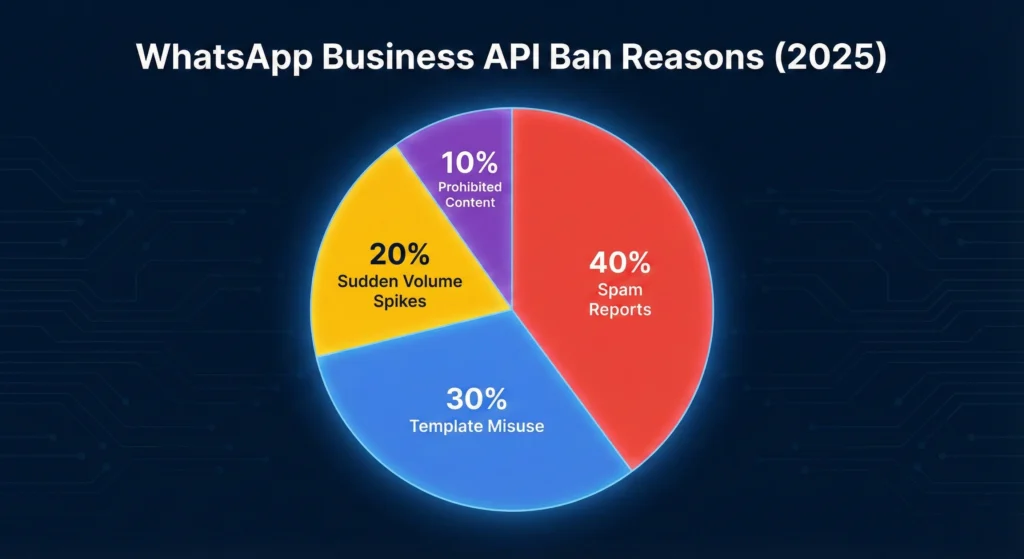
Understanding why others get banned helps you avoid their mistakes. The data shows a clear pattern between user feedback and bans.
Violation Types vs. Suspension Duration
| Violation Type | Severity | Typical Consequence | Suspension Duration |
| High Block Rate | High | Account Restriction | 24 - 48 Hours |
| Template Misuse | Medium | Template Paused | Until Fixed |
| Prohibited Content | Critical | Permanent Ban | Indefinite |
| Spam Reports | High | Tier Downgrade | 7 Days |
| Unusual Spikes | Medium | Temporary Block | 12 - 24 Hours |
The Correlation Between Block Rates and Account Restrictions
There is a direct link between blocks and bans. If more than a small percentage of your messages are blocked by users, your quality score drops.
Once your quality score hits "Low" (Red), Meta restricts your ability to send templates. You can only respond to user-initiated conversations. This kills your marketing campaigns instantly.
Visualizing the 'Red Zone': When Quality Rating Drops Below Average
Your WhatsApp Manager dashboard shows your health status.
- Green: Good. You can scale up.
- Yellow: Warning. Slow down and check your content.
- Red: Critical. You are in the danger zone.
If you stay in the Red Zone for more than 7 days, your daily messaging limit will be lowered automatically.
Recovery and Ban Appeals
If the worst happens and you get banned, do not panic. Follow these steps to recover your account.
Diagnosing the Specific Violation Code
First, log in to your Meta Business Manager. Go to "Account Quality." It will show you the specific reason for the ban. Do not guess. Read the alert carefully. It might be a template issue, or it might be a user feedback issue.
Copy-Paste Appeal Scripts for False Positive Suspensions
If you believe the ban was a mistake, you can appeal. Use a professional tone.
"Dear Support Team,
Our account [Business Name] was recently restricted. We strictly adhere to all WhatsApp Business Policies. We have proof of opt-in for all contacts and maintain a low block rate. We believe this restriction was triggered by a false positive during a recent utility update. Please review our account health and restore
access. Thank you."
How API Appeals Differ from App Appeals
Appealing an API ban is different from the regular WhatsApp app. You must go through the Meta Business Suite. Do not email standard WhatsApp support. They cannot help with API issues. Use the "Request Review" button directly inside the Business Manager dashboard.
Best Practices to Avoid Bans
Prevention is better than cure. The best way to avoid bans is to act like a human, even when using automation.
The 7-Day Phone Number Warm-Up Schedule for New APIs
When you get a new number, do not blast 1,000 messages on Day 1. You need to warm it up.
- Day 1: Send 50 messages.
- Day 2: Send 100 messages.
- Day 3: Send 200 messages.
- Day 4: Send 400 messages.
- Day 5-7: Gradually increase to your limit.
Implementing Frictionless Opt-Out Commands (STOP, UNSUBSCRIBE)
Make it easy for people to leave. If they can't opt out easily, they will block you. A block hurts your score. An opt-out does not. Always include a footer that says, "Reply STOP to unsubscribe."
Using Waplify Features to Automate List Hygiene and Remove Blockers
You can automate this process using advanced tools. Check out the Features of Waplify. You can set up rules that automatically remove anyone who replies with "STOP" from your list. This keeps your list clean and your quality score high.
Automation Without Violation
Automation is powerful, but it must be smart. Dumb automation leads to spam complaints.
Balancing Chatbots with Mandatory Human Handoff Paths
Chatbots are great for answering FAQs. However, users get frustrated if they are stuck in a loop. You must always offer a way to speak to a human. A button that says "Chat with Support" can save a conversation and prevent a block.
Scheduling Broadcasts to Avoid 'Spike' Detection Algorithms
Do not send 10,000 messages at the exact same second. This looks like a bot attack. Spread your broadcast out over a few hours. This is safer for your account and allows your support team to handle replies more effectively.
Building a Sustainable WhatsApp Channel
Compliance in 2025 is about quality, not just quantity. By respecting the user and following the rules, you build a channel that generates revenue for years.
The Golden Rules of 2025
- Get Consent: Never message without permission.
- Be Honest: Label your templates correctly.
- Watch Your Health: Monitor your Quality Score daily.
- Warm Up: Increase volume slowly.
Auditing Your Current Waplify Account Settings
Take a moment today to look at your setup. Check your opt-in methods. Review your template categories. A 10-minute audit now can save you weeks of headaches later. Ensure your settings align with the 2025 standards to keep your business growing safely.