
A WhatsApp Autoresponder That Knows When to Stop
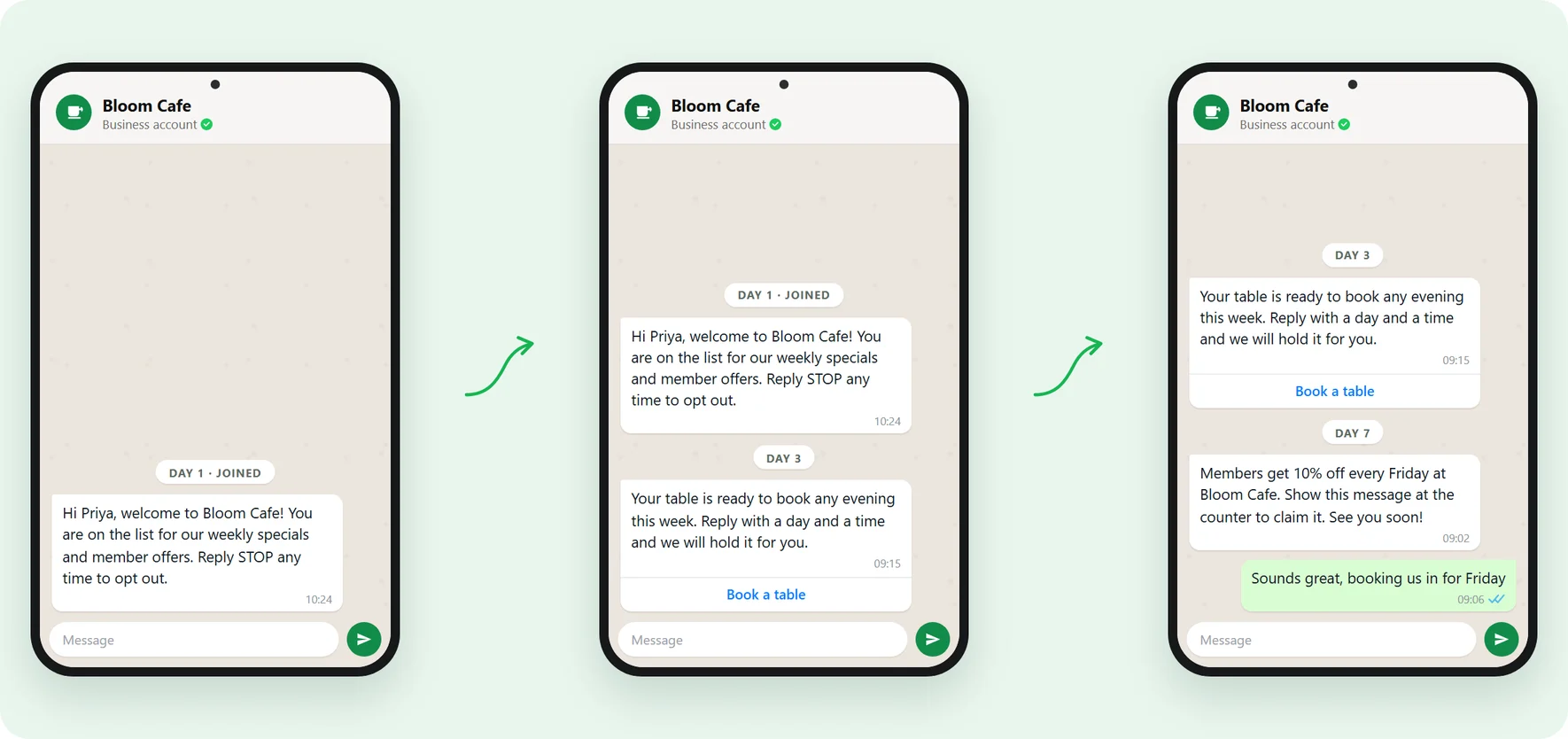
Write the welcome message and the follow-ups once. Each contact moves through them on their own timeline, inside the hours you choose, and the whole thing stops the second they reply.
Included on every plan. Sent on the Official WhatsApp Business API.
What is a WhatsApp autoresponder?
A WhatsApp autoresponder sends a planned series of messages to each contact automatically, spaced out over minutes, hours or days. You write it once and every person who enters moves through it on their own timeline, without anyone sending each message by hand.
-
A series, not one reply
Up to seven messages in order, each with its own delay. A welcome today, the useful tip tomorrow, the nudge three days later.
-
Per contact, not per campaign
Everyone starts at their own step one, whenever they join. Somebody who signs up today is on day one while last week's signups are on day seven.
-
It knows when to stop
A reply ends the series and hands the conversation to a person. So does an opt-out, a STOP keyword or an unreachable number.
The welcome message goes out. Nothing after it does.
Almost nobody buys on the first message, and almost every business stops after it, because message two depends on a person remembering.
-
Follow-up needs somebody free
A lead that arrives on Friday evening gets its second message when someone next has a quiet moment. By then they have asked three other suppliers.
-
New customers get nothing
The onboarding tips, the how-to, the thing everyone gets stuck on. All of it lives in somebody's head instead of going out on day one, three and seven.
-
The reminder system is a person
A tab of numbers, a column of dates, and someone pasting the same message. It works until the list outgrows the person, and nothing is recorded.
What keeps it from annoying people
An autoresponder that cannot be steered is just a faster way to lose customers. Four settings are the difference, and each one ships in the product.
-
Sends inside your hours
Choose the days and hours follow-ups may go out in. A message due at 11pm waits for morning.
-
Stops when a human is needed
The moment someone writes back they leave the sequence and land in your shared team inbox.
-
Reporting that names the failure
Sent, delivered, read, replied and failed, for the whole sequence and per step. Open a failed count and it names the reason.
-
Fills itself
Write a rule instead of picking a list. Contacts join the moment a tag lands or a status changes, and each person enters once.
How to set up a WhatsApp autoresponder
Three screens in the builder, and only the templates involve waiting.
-
Get your templates approved
Every message in the series uses a WhatsApp template Meta has approved. Write the two or three you need and submit them.
-
Decide who enters
Pick a fixed list of contacts, groups or a filter, or write an auto-enroll rule so people join in real time as they match it.
-
Build the series
Add up to seven steps. Choose a template for each, map contact fields into its variables with a fallback, and set the delay before it sends.
-
Set the hours and launch
Choose the days and times follow-ups may send, decide whether a reply ends it, then run it now or schedule it up to 90 days ahead.
Six sequences worth writing first
-
A welcome sequence
Say hello the moment somebody joins, then send the two or three things every new customer needs in their first week. The easiest one to write.
-
Lead follow-up
An enquiry arrives and gets an answer in seconds. If nobody replies, two more messages go out over the next few days, then it stops rather than nagging.
-
Onboarding
Walk a new customer through setup one step at a time. Turn on wait-for-delivery so the steps arrive in order even if their phone was offline.
-
Winning back quiet customers
Tag the people who have gone quiet and let the auto-enroll rule pick them up as the tag lands. Anyone who answers reaches your team instead.
-
Post-purchase check-in
When an order is tagged as delivered, ask how it went a day later and how to reorder a week after that. Replies land in the inbox, not in a report nobody reads.
-
A lesson drip
Teach one thing per message across a week, the classic drip campaign, so a new customer learns the product without a single call from your team.
WhatsApp autoresponder questions, answered
Including the two things it deliberately cannot do.
1. How do I set an automatic welcome message on WhatsApp?
2. What is the difference between an autoresponder and an auto reply?
3. How many messages can an autoresponder send?
4. What is the difference from the free WhatsApp Business app?
| Free app greeting and away messages | A drip sequence | |
|---|---|---|
| How many messages | One, the same to everyone | Up to 7, in order |
| When they send | Instantly, on an incoming message | On a delay you set, up to 30 days per step |
| Personalised | No | Yes, per contact |
| Stops when they reply | Not applicable | Yes, and hands the chat to your team |
| Reporting | None | Sent, delivered, read, replied, failed, per step |
| Starts on its own for new contacts | No | Yes, with an auto-enroll rule |
5. What happens when a customer replies?
6. Is this the same as a drip campaign?
7. When do the follow-ups actually send?
8. What reporting do I get?
9. Can contacts be added automatically?
10. Can I send birthday or renewal reminders?
11. Do I need approved message templates?
12. Will an autoresponder get my number banned?
13. How is this different from a broadcast?
Get Lifetime Access to Waplify Today
Stop paying for monthly subscriptions. Automate your business forever with a one-time investment.