
WhatsApp Forms: Collect Every Detail in One Screen
A form that opens inside the WhatsApp chat. No link to tap, no browser, nothing for the customer to install. They fill it in on one screen and the answers land in your table, already attached to their contact.
Included on every plan. Built on Meta Flow JSON 7.3.
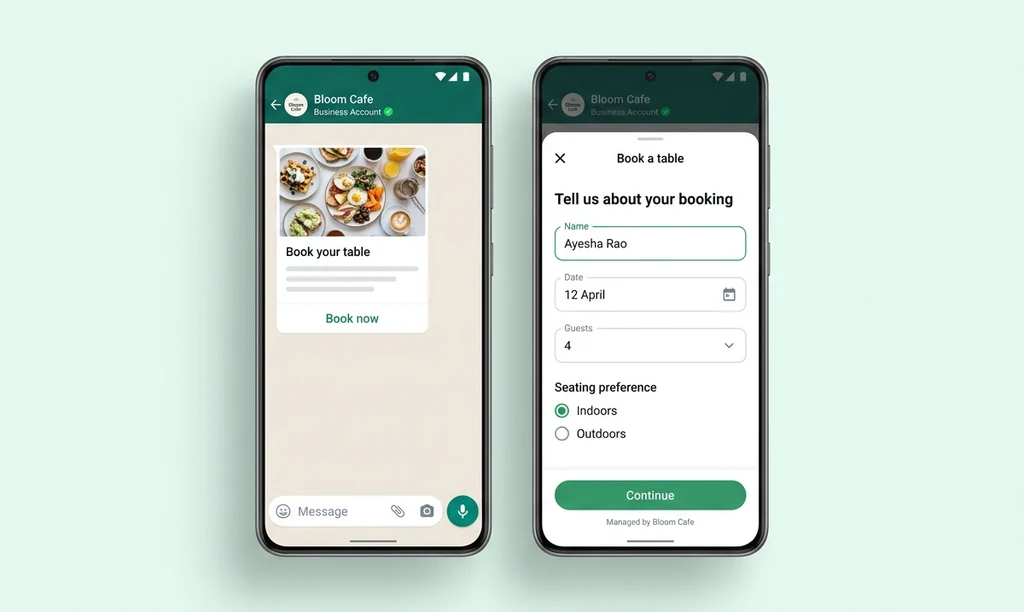
What are WhatsApp Forms?
A WhatsApp Form is a fill-in form that opens inside the WhatsApp chat itself, with no link to follow, no browser and nothing to install. The customer taps a button, completes the fields on a single screen, and the answers arrive in your submissions table already joined to their contact record.
-
It never leaves WhatsApp
The form opens over the conversation. The customer is not handed off to a website, so the tap that usually loses them never happens.
-
One screen, not twenty messages
Everything you need is asked at once instead of question by question. Text, dates, choices, photos and documents on the same screen.
-
Answers arrive structured
One row per response and one column per question, named after what you asked. Not a thread you have to read back through.
Asking for details in a chat loses people
Every extra step between the question and the answer costs you replies. Three of them are usually self-inflicted.
-
Nobody taps the link
A form link means leaving WhatsApp, waiting for a page, and typing on a site they have never seen. A share of people stop at the tap, and you never learn which ones.
-
The answers scatter through the thread
Name in one message, address in another, a photo somewhere above. Reconstructing one enquiry means scrolling, and copying it anywhere means retyping it.
-
One question at a time is slow
Asking six things takes six round trips, and the customer drifts away somewhere around the third. The order, the booking or the claim never gets completed.
Build it, send it, and read what comes back
A visual builder, three ways to deliver it, and one table at the end. No code at any point.
-
Twelve field types, no code
Short text, long text, dropdowns, radio buttons, checkboxes, tappable chips, dates and date ranges, photo upload, document upload, a consent tick box and a navigable list. Up to 50 components on a screen, with a live preview of the phone.
-
Send it three ways
Inside an open conversation as an interactive message, from a broadcast campaign on an approved template, or as a step in a drip sequence. The same form, whichever way it goes out.
-
Every answer in one table
One row per response, columns named after your questions. Photos preview as thumbnails, documents download in one click, and the whole table exports to CSV. A cross-form view lists responses across every form you run.
-
Send the answers onward
What someone entered is available to every step that runs after the form. Quote it back in a confirmation, branch on the option they picked, write it onto their contact record, or push the row straight into a Google Sheet or your own system with the connector and webhook blocks.
How to create a form on WhatsApp
Four steps, and only the third one involves waiting.
-
Build and preview it
Drag the fields you need onto the screen and watch the live preview render it exactly as it will look on the phone.
-
Publish it
Waplify validates the form before it ever reaches Meta, so the usual mistakes surface in the builder rather than as a rejection.
-
Send it
Attach it to a conversation, a campaign or a sequence step. Each recipient gets their own token, so every response is traceable.
-
Read the submissions
Answers appear as they arrive, one row each. Filter them, open the uploads, and export the lot to CSV.
Six forms worth building first
-
Order forms
Product, quantity, size, delivery address and a photo of the reference, captured in one screen instead of a dozen messages.
-
Appointment booking
Service, preferred date and a phone number, with a date picker instead of a customer typing "next Tuesday maybe".
-
Event and class registration
Name, batch, and the documents you need uploaded, all before anyone opens a spreadsheet.
-
Feedback and surveys
Rate the order, pick a reason, add a comment. Structured answers you can count, not sentiment buried in a chat thread.
-
Support requests
Issue type, order number and a photo of what went wrong, so the first reply can already be the useful one.
-
Quote requests
Requirement, quantity, timeline and a document upload for the specification, arriving as a row your team can work.
WhatsApp Forms questions, answered
Taken from what people actually search alongside this.
1. Are WhatsApp Forms and WhatsApp Flows the same thing?
2. How do I create a form on WhatsApp?
3. What can a WhatsApp Form collect?
4. Do customers need to install anything?
5. What is the difference between a WhatsApp Form and a link to a web form?
| WhatsApp Form | A link to a web form | |
|---|---|---|
| Where it opens | Inside the chat | A browser, after a tap |
| Taps to start | One | Two, plus a page load |
| Leaves WhatsApp? | No | Yes |
| Photos and documents | Yes, up to 30 files per question | Depends on the form |
| Where answers land | Your submissions table, joined to the contact | Wherever that tool keeps them |
| What you need | The WhatsApp Business API | Nothing |
6. Can I send a form from a campaign or a sequence?
7. Can I export the responses to Excel?
8. Can the answers go straight into another tool?
9. Can I edit a form after publishing it?
10. Is WhatsApp Forms free?
11. I already built forms in WhatsApp Manager. Do I have to rebuild them?
Get Lifetime Access to Waplify Today
Stop paying for monthly subscriptions. Automate your business forever with a one-time investment.