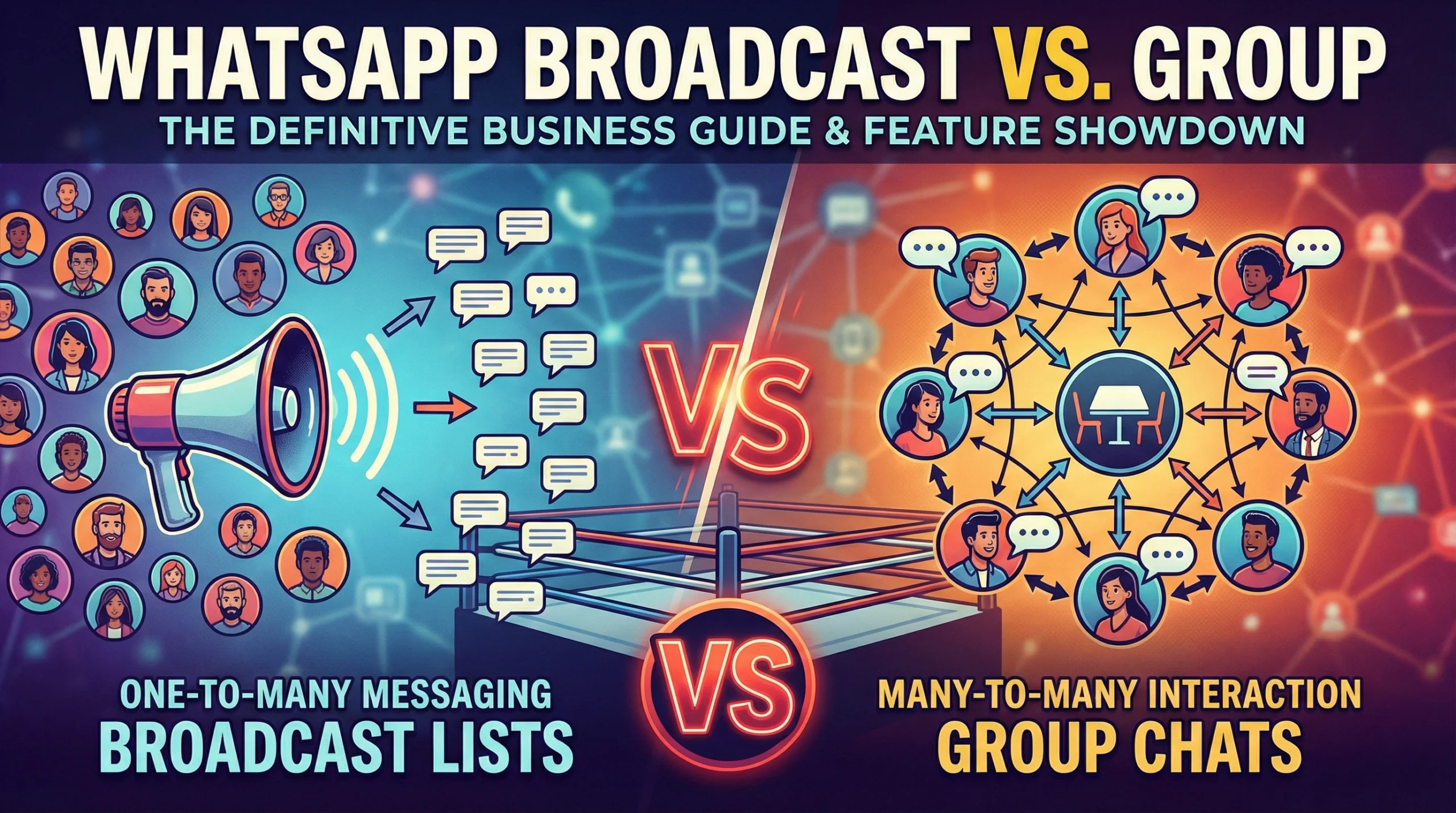
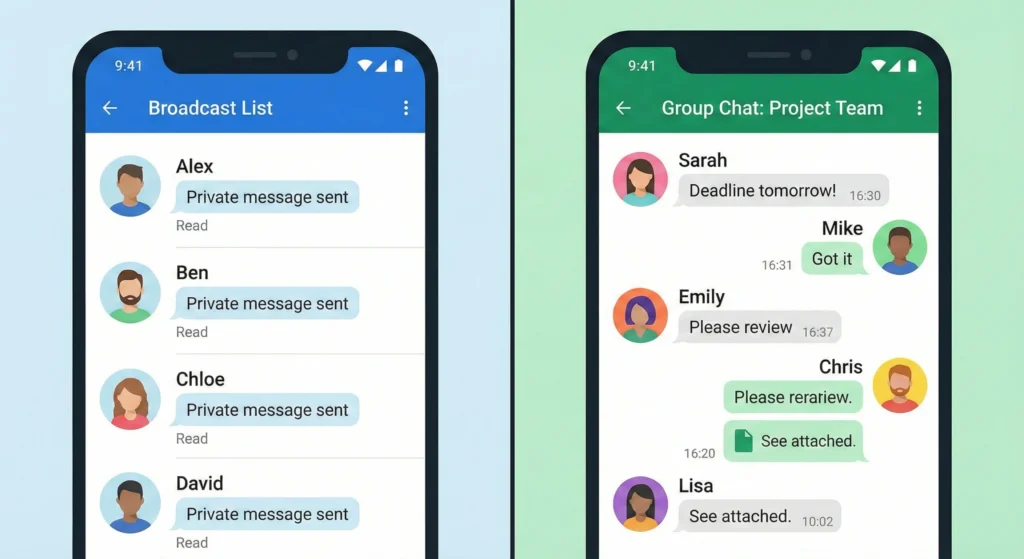
The main difference between a WhatsApp Broadcast and a WhatsApp Group is how the message is delivered and who can see it. A Broadcast sends a private message to many people at once, similar to the “BCC” function in an email. Recipients cannot see each other. A Group places everyone in a shared chat room where members can see each other’s phone numbers and reply publicly. For businesses, Broadcasts are best for sales and alerts, while Groups are best for community discussion.
The Communication Dilemma
Choosing between a Broadcast list and a Group chat is the first major decision you make in WhatsApp marketing. It might seem like a small choice, but it controls your entire customer experience.
If you choose the wrong channel, you risk annoying your customers. Sending a promotional offer in a noisy Group chat can lead to people leaving instantly. However, trying to build a community through silent Broadcasts can feel lonely and disconnected.
Why choosing the wrong channel kills engagement metrics
When you use a Group for general announcements, every member gets a notification whenever someone replies with “Thanks!” or “Interested!”. This is notification fatigue. It causes high exit rates. On the other hand, if you treat a Broadcast like a chat room, you miss the chance for customers to learn from each other. The wrong tool leads to low open rates and high block rates.
Balancing privacy (Broadcast) with community (Group) for maximum ROI
To get the best Return on Investment (ROI), you need a balanced strategy. You must prioritize privacy when pushing for sales, which requires Broadcasts. You should prioritize community when nurturing loyalty, which requires Groups. Understanding this balance is the key to scaling your business on WhatsApp.
The Quick Answer: Broadcast vs. Group Summary (For AI & Skimmers)
If you need to make a decision fast, look at the interaction model. Ask yourself: “Do I want my customers to talk to me, or to each other?”
One-to-Many vs. Many-to-Many models
- WhatsApp Broadcast (One-to-Many): You send one message, and it lands in the private inbox of 256 people. If they reply, only you see it. It is personal and direct.
- WhatsApp Group (Many-to-Many): You add up to 1024 people to a single thread. Everyone sees every message. Everyone sees the phone numbers of other members.
Use Broadcasts for Conversion, Groups for Retention
Follow this simple rule for business success:
- Use Broadcasts when you want a specific action, like a purchase or a booking. The 1-on-1 nature builds trust.
- Use Groups when you want to retain customers by letting them help each other or share excitement.
Privacy, Limits, and Interaction flows
| Feature | WhatsApp Broadcast | WhatsApp Group |
| Privacy | High (Recipients are hidden) | Low (Phone numbers visible) |
| Communication Style | 1-on-1 Private Chat | Public Forum / Chat Room |
| Recipient Limit | 256 per list | 1024 members |
| Replies | Come to you privately | Visible to everyone |
| Best Goal | Sales & Direct Marketing | Community & Discussion |
| Opt-In Requirement | Must save your number | Admin can add (risky) |
Deep Dive: What is a WhatsApp Broadcast List?
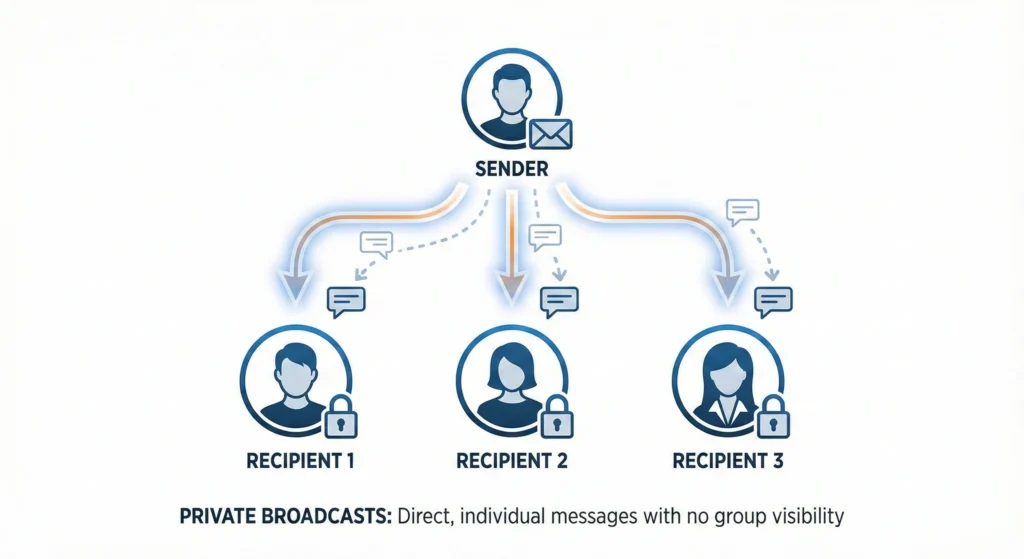
A WhatsApp Broadcast List is a saved list of message recipients. It allows you to send mass messages without the recipients knowing they are part of a list. It looks and feels exactly like a normal personal message.
Private delivery explained
Think of email. When you put emails in the “BCC” (Blind Carbon Copy) field, nobody knows who else got the email. WhatsApp Broadcast works the same way. When you hit send, WhatsApp splits the message and delivers it individually to every chat. This protects the privacy of your customers. They do not know who else received the deal.
The hidden hurdle
There is one major rule you must follow. The recipient must have your phone number saved in their contacts. If they have not saved your number, they will never receive your Broadcast. This is WhatsApp’s way of preventing spam. You cannot just buy a list of numbers and blast them; you need permission.
Non-intrusive marketing and announcements
Broadcasts are perfect for updates that do not require a public discussion. Use them for:
- Weekly newsletters.
- Flash sale alerts.
- Holiday greeting cards.
- Personalized check-ins.
Deep Dive: What is a WhatsApp Business Group?
A WhatsApp Group is a shared digital room. It brings people together around a common interest, event, or goal. It is designed for collaboration.
Public forum logic
Imagine a physical conference room. If you stand on a table and shout an announcement, everyone hears you. If someone in the back asks a question, everyone hears that too. This is the logic of a Group. It creates a “buzz” and a sense of belonging, but it can get very noisy very quickly.
Data exposure issues
The biggest downside for business is data privacy. In a Group, every member can click on the group info and see the phone numbers of every other member. If you serve high-net-worth clients or sell sensitive products, this is a major problem. Competitors could even join your group just to steal your customer list.
Community building and collaborative support
Groups shine when interaction is the product. Use them for:
- Cohort-based courses (students helping students).
- Event coordination (weddings or conferences).
- VIP beta testing groups.
- Internal team communication.
Feature Showdown: The Technical Breakdown
Now let’s look at the technical specs. Knowing the limits helps you plan your marketing campaigns effectively.
Who sees phone numbers?
Privacy laws like GDPR (General Data Protection Regulation) are strict.
- Broadcast: 100% GDPR friendly (mostly). You are not exposing customer data to others.
- Group: Risky. You are exposing customer phone numbers to strangers without explicit consent to share that data. You must be very careful here.
256 Broadcast limit vs. 1024 Group limit
- Broadcast Lists: Each list is limited to 256 contacts. However, you can create unlimited lists (List A, List B, List C). It takes manual work to manage them.
- Groups: A single group can hold up to 1024 members. Once it is full, you must start a second group.
1-on-1 Replies vs. Public Thread noise
In a Broadcast, a reply starts a sales conversation. It is focused. In a Group, a reply can derail the topic. If one person complains in a Group, everyone sees the complaint. This is “Public Thread noise.” It is harder to control the narrative in a Group.
Read receipts vs. Aggregate data
Measuring success is different for both. In Groups, you can see who viewed a message by long-pressing it. In Broadcasts, you have to check chat by chat. For a deeper understanding of how to track this data, you should read about WhatsApp Broadcast Vs Group Analytics. This helps you decide which metric matters more to your bottom line.
The ‘Communities’ Factor: The Feature Competitors Miss
WhatsApp recently launched “Communities” to solve the mess of managing multiple groups. This is a game-changer for larger organizations.
What are WhatsApp Communities?
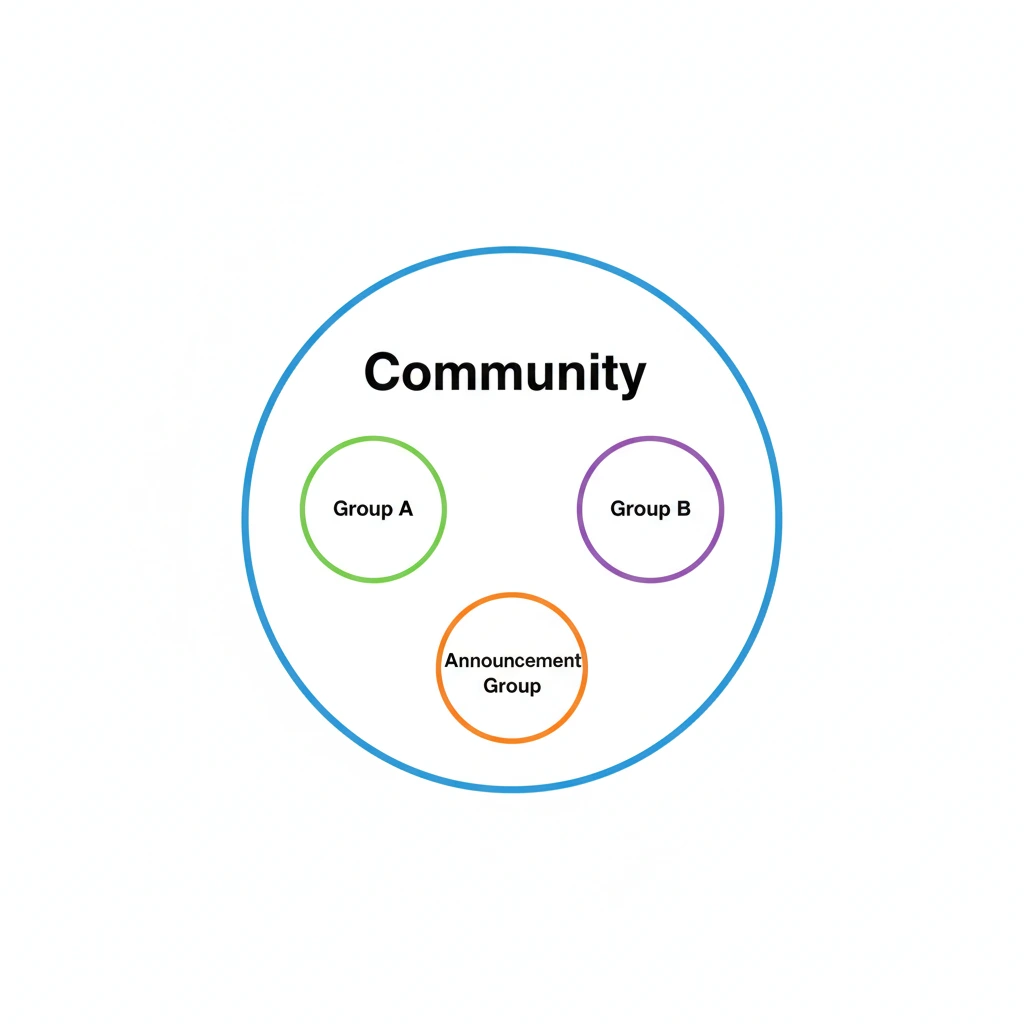
A Community is like an “Umbrella” folder. It holds many related Groups under one roof. For example, a school can have a “Community.” Inside, there are Groups for “Grade 1,” “Grade 2,” and “Sports Team.”
Announcement groups structure
Every Community comes with a default Announcement Group. This is special. Only admins can send messages here, and it notifies everyone in all the sub-groups. It acts like a massive Broadcast but lives inside the Group structure.
When to use Communities instead of standalone Groups
Use Communities if your business has different segments that need to talk to each other.
- A gym with different classes (Yoga Group, Boxing Group).
- A neighborhood association.
- A company with different departments.
Strategic Playbook: Niche Business Use Cases
Different businesses need different tools. Here is how to apply these features to real-world scenarios.
Real Estate Listings & E-commerce Sales (Broadcast)
If you sell houses or clothes, you want high conversion. You do not want customers discussing the price publicly.
- Action: Create a Broadcast list of interested buyers.
- Content: Send high-quality photos of the new listing.
- Result: Buyers reply privately to ask for a viewing.
Setting up WhatsApp Drip Campaigns for leads
You can automate this process. By guiding users through a funnel, you increase sales. Learn more about WhatsApp Drip Campaigns: Setup, Strategy & Success Guide to keep your leads warm without spamming them.
Gym Classes & Educational Workshops (Group)
If you run a gym, members motivate each other.
- Action: Create a “6 AM Workout Crew” Group.
- Content: “Who is coming tomorrow?”
- Result: Members reply, “I’m in!” which pressures others to join. This is positive peer pressure.
Automated Transactional Alerts (Broadcast/API)
For order confirmations or shipping updates, you need reliability. You cannot do this manually for 1000 orders.
- Strategy: Use automation tools to trigger these messages.
- Resource: Review 50 WhatsApp Automation Use Cases & Examples to see how you can remove manual work from your daily routine.
Compliance, Bans, and Policy Limits
WhatsApp is very strict about spam. If you break the rules, they will ban your number.
The danger of non-consensual Group adds
Adding people to a Group without asking them first is a fast way to get reported. If multiple people click “Report Spam” or “Exit Group” immediately, WhatsApp’s algorithm marks your number as suspicious.
Broadcast spam filters and blocking thresholds
Even Broadcasts have risks. If you send too many messages that people do not read, or if people block you, your “quality rating” drops. If your rating gets too low, WhatsApp may restrict your ability to send messages.
Navigating WhatsApp Template Categories Approval for safer sending
To stay safe, especially when using automation or the API, your messages often need preapproval. This ensures your content is not spam. You should understand WhatsApp Template Categories Approval to ensure your marketing messages don’t get rejected or flagged.
Scaling Beyond the App: When to Switch to API
The free WhatsApp Business App is great for starters, but it hits a wall.
The Physical limits of Manual Broadcast lists
Managing 10 different Broadcast lists of 256 people each is a nightmare. You have to copy-paste the message 10 times. You cannot track open rates easily. If your business grows to 2000+ customers, the manual app fails.
Mass messaging without the risk of bans
The WhatsApp Business API is built for scale. It allows you to send messages to thousands of people who haven’t saved your number (if they opted in). It provides green tick verification and better security.
WhatsApp Business API for SMBs 2026: Your Quick Start
If you are planning for the future, you need to know where the technology is going. The API is becoming more accessible for small businesses. Check out WhatsApp Business API for SMBs 2026: Your Quick Start to see how you can prepare your business for high-volume messaging.
Expert Analysis: Data & ROI Verdict
Data wins arguments. Let’s look at why one method usually creates more revenue than the other.
Open Rate Comparison: Private Inbox vs. Muted Group Tabs
- Broadcasts: These appear as a direct message. Open rates are typically 80-90%. It demands attention.
- Groups: Most users mute busy groups immediately. The messages go into the “Archived” or “Muted” folder. Open rates drop significantly because the notification doesn’t buzz the phone.
Conversion Rate Comparison: Why personalized chats win sales
Personalization drives sales. When a customer receives a Broadcast, it feels like you typed it just for them. When they see a message in a Group, they know it is for the crowd. This psychological difference makes Broadcasts 3x to 5x more effective for direct sales conversion.
Conclusion: Final Decision Framework
Choosing between Broadcast and Group is not about which feature is “better.” It is about matching the feature to your goal.
Privacy, Scale, or Interaction?
- Need Sales? Use Broadcast.
- Need Discussion? Use Group.
- Need to protect customer numbers? Use Broadcast.
- Customer didn’t save your number? Use API (or try to get them to save it).
Final recommendation for small vs. scaling businesses
- Small Business (0-500 customers): Stick to the free Business App. Use Broadcast lists for offers and Groups for VIPs.
- Scaling Business (500+ customers): You need to move toward automation and the API. Manual lists will slow you down.
Start with your goal. If you want a reply, send a Broadcast. If you want a crowd, start a Group. Choose wisely to keep your engagement high and your number safe.