
WhatsApp Template Category Breakdown: Selecting the Right Type for Swift Approval
Selecting the correct WhatsApp template category is the single most important step to ensure your message is approved quickly by Meta. If you choose the wrong category, your template will be rejected, your campaign will be delayed, and your phone number quality score may drop. There are only three main categories: Utility (for transaction updates), Authentication (for login codes), and Marketing (for everything else).
Getting this right saves you money. Marketing conversations cost more than Utility conversations. If you try to sneak a marketing message into a utility template, WhatsApp's automated systems will flag it. This guide breaks down exactly how to pick the right type every time so you can focus on growing your business.
The High Cost of Template Misclassification
When you send a message template to WhatsApp for approval, an AI system reviews it instantly. If the AI is unsure, a human reviews it. If you classify a sales coupon as a "shipping update," it will be rejected.
Frequent rejections harm your business in two ways:
- Blocked Campaigns: You cannot send messages until you fix the template.
- Higher Costs: If you accidentally use a Marketing template for a simple update, you
pay the higher Marketing rate.
Meta also uses auto-reclassification. This means if you pick "Utility", but the message looks like "Marketing," Meta will change it automatically. This changes how much you pay. It is better to get it right the first time.
The 3 Core WhatsApp Template Categories Defined
To keep things simple, WhatsApp groups all business-initiated messages into three buckets. You must choose one of these when you create a template.
Utility Templates: Specific Post-Transaction Updates
These messages confirm a specific action the user took. They are transactional.
- Examples: Order confirmations, shipping updates, monthly billing statements.
- Rule: There must be an active order or account change that the user requested.
Authentication Templates: Identity Verification Only
These messages have one job: security. They verify that the person typing the phone number owns that number.
- Examples: One-Time Passwords (OTP), account recovery codes.
- Rule: No logos, no images, and no extra text allowed.
Marketing Templates: Promotions, Awareness, and Everything Else
If a message does not fit strictly into Utility or Authentication, it is Marketing. This is the "catch-all" category.
- Examples: Sales offers, newsletters, welcome messages, and product launches.
- Rule: If it helps you sell or keeps your brand in the customer's mind, it is marketing.
The '3-Second Rule' Flowchart for Selection
You can choose the right category in less than three seconds by asking three simple questions. Follow this flow before you submit any template.
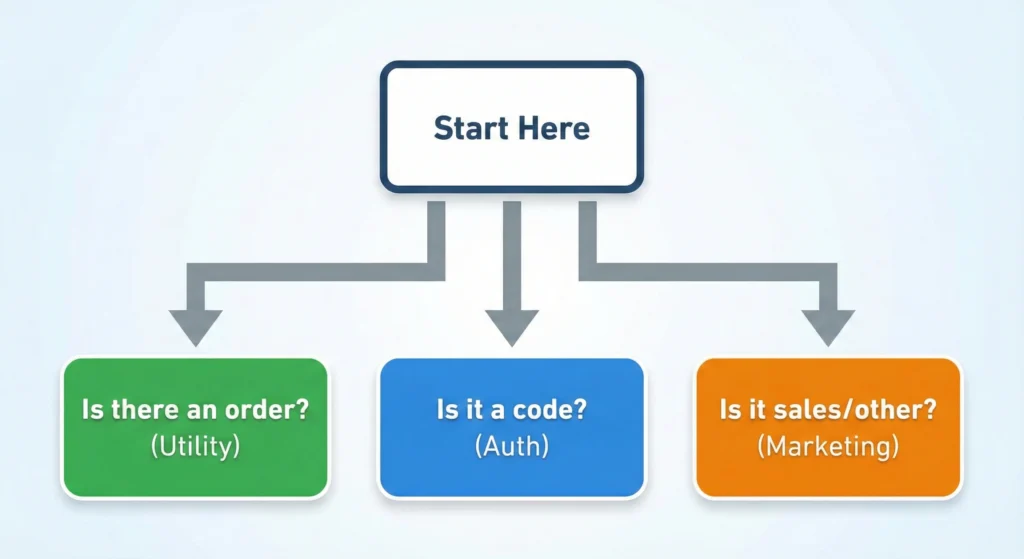
Step 1: Is there an open, active transaction?
Ask yourself: "Did the customer just buy something or ask for a receipt?"
- Yes: It is likely Utility.
- No: Go to Step 2.
Step 2: Is this purely for security login?
Ask yourself: "Is the user trying to log in right now?"
- Yes: It is Authentication.
- No: Go to Step 3.
Step 3: Does it invite engagement or sales?
Ask yourself: "Do I want them to buy, read, or reply?"
- Yes: It is Marketing.
If you are still unsure, it is almost certainly Marketing.
Utility Category Requirements
Utility templates are strictly for information. They tell the customer what is happening with an order or account. Because these messages are important to the user, WhatsApp usually charges less for them.
The Necessity of Transaction IDs
To prove a message is a Utility, you should include specific details. Generic messages like "Your order is updated" might get rejected. Instead, use variables to show specific info.
- Bad: "Your order has shipped."
- Good: "Order # {{1}} has shipped and will arrive on {{2}}."
Prohibited Content: Upselling in Transactional Messages
You cannot sell inside a Utility message. This is the most common reason for rejection.
- Rejected: "Here is your receipt for Order #123. Check out our new arrivals for 20% off!"
- Approved: "Here is your receipt for Order #123. Thank you for your business."
If you add a coupon code or a link to a "New Collection," Meta will reclassify it as Marketing.
Use Case: Travel Booking Confirmations and Status Updates
Travel businesses use Utility templates frequently. When a user books a flight or hotel, they need immediate confirmation. This is not the time to sell them a tour package. For a deeper look at how travel companies handle this securely, read about WhatsApp API vs. 3rd-Party: Travel Booking Confirmations.
Authentication Category Requirements
Authentication templates are the strictest. Meta does not allow you to change the wording much. This protects users from spam and phishing attacks.
Zero-Tap vs. Copy Code Syntax
You can send codes in two ways:
- Copy Code: The user sees the code and copies it manually.
- Zero-Tap (Autofill): A button allows the phone to automatically verify the app without the user typing anything. This provides a better user experience.
Strict Formatting Rules for OTP Delivery
You cannot add emojis, lengthy greetings, or branding to these messages.
- Correct: "123456 is your verification code."
- Incorrect: "Hi there! Welcome to our family. Here is your code: 123456. Happy shopping!
Expiry Settings and Security Best Practices
You must ensure these codes expire quickly (usually 5-10 minutes). Do not use this category to send "Welcome Passwords" that last forever. That is a security risk and will lead to template rejection.
Marketing Category & Catch-All Rules
Marketing is the most flexible category. It supports images, videos, and creative text. However, it is also the most expensive category.
Why 'General Inquiry' is Now 'Marketing'
In the past, simple messages like "Hi, how can we help?" were sometimes considered service messages. Now, Meta classifies almost all open-ended conversations as Marketing. If a message does not link to a specific past order, it is Marketing.
Structuring Templates for Drip Campaigns
Marketing templates are perfect for drip campaigns. These are sequences of messages sent over time to nurture a lead. You can send a product intro on Day 1, a testimonial on Day 3, and a discount on Day 5.
For a complete strategy on setting this up, check out our The Ultimate Guide to WhatsApp Drip Campaigns: Setup, Strategy, and Success Metrics
Industry Example: Real Estate Lead Nurturing Templates
Real estate agents use Marketing templates to send property listings. Since a house listing is a "product" and the goal is a sale, this is always Marketing.
- Template: "Hi {{1}}, we found a 3-bedroom apartment in {{2}} that fits your budget. Want to see photos?"
To learn how top agents use this effectively, read to learn how top agents use this effectively, read The Ultimate Guide to WhatsApp Business Api for Real Estate Boost Leads Close Deals.
Feature & Pricing Comparison Matrix
Understanding the cost and approval speed helps you plan your budget. Marketing messages cost more because they drive revenue. Utility messages cost less because they are necessary service updates.
Cost Differences (Utility vs. Marketing)
| Feature | Utility Category | Marketing Category | Authentication |
| Primary Goal | Inform (Order Updates) | Convert (Sales/Awareness) | Verify (Security) |
| Cost | Low | High | Lowest |
| Content Rules | Strict (No upselling) | Flexible (Promotions allowed) | Very Strict (Code only) |
| Media Allowed? | Yes (PDFs/Images for receipts) | Yes (Video/Image/Catalog) | No |
Average Approval Times by Category
| Category | Typical Approval Speed | Common Delay Reason |
| Utility | Instant to 5 Minutes | Promoting a product in the text |
| Authentication | Instant | Incorrect variable formatting |
| Marketing | 5 to 15 Minutes | Policy violations or offensive content |
Avoiding Automatic Rejection
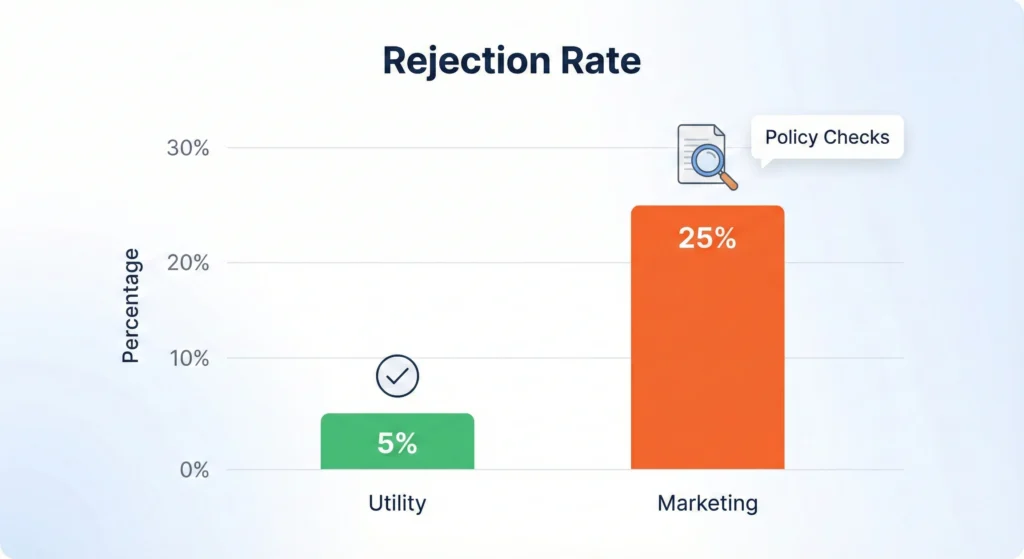
Even if you pick the right category, bad formatting will cause rejection. Meta's computer system reads the code, not just the words.
Variable Spacing: {{1}} vs {{1}}
Variables are the placeholders where you put names or numbers.
- Correct: {{1}} (No spaces)
- Incorrect: {{ 1 }} (Spaces inside brackets)
If you add spaces, the system might not recognize the variable.
The 'Floating Parameter' Error
A "Floating Parameter" happens when you put a variable at the very end or beginning of a line without text around it.
- Risky: {{1}}
- Safe: Hello {{1}},
Meta wants to know what the variable stands for. Surround it with words.
Link Integration: WhatsApp Business API Compliance Checklist 2025
Links in templates must be secure (https) and clear. Do not use link shorteners like bit.ly, as they look like spam. Your full domain should be visible.
Before you submit your next batch of templates, run them through the WhatsApp Business API Compliance Checklist 2025 to catch errors early.
Rejected vs. Approved Examples
Sometimes the line between categories is blurry. Here are real-world examples to help you decide.
Case Study: The 'Feedback Request' Trap
- Scenario: You want to ask a customer if they liked their product.
- Common Mistake: Selecting "Utility" because it relates to an order.
- Reality: Meta views surveys and feedback requests as Marketing because they drive engagement.
- Verdict: Submit as Marketing.
Case Study: Ambiguous Welcome Messages
- Scenario: A user signs up on your website, and you send a WhatsApp greeting.
- Common Mistake: Selecting "Utility" because they just signed up.
- Reality: Unless you are sending a specific password (Auth), a general "Welcome to the club" is Marketing.
Before & After: Fixing a Mixed-Category Template
Rejected (Utility Category):
"Your order #123 is confirmed! Check out our matching shoes here: [Link]"
Reason: Contains a sales link.
Approved (Utility Category):
"Your order #123 is confirmed. It will ship within 24 hours."
Approved (Marketing Category):
"Thanks for ordering! We think you might also like these matching shoes: [Link]"
Handling Auto-Reclassification
Meta's AI is smart. If you submit a Marketing message as Utility to save money, Meta will likely catch it and change the category to Marketing automatically.
Navigating the July 2025 Policy Updates
WhatsApp updates its policies often. The trend is moving towards stricter separation. Expect simpler Utility templates and more creative freedom for Marketing templates. Always check the category label after approval to see if Meta changed it.
Auditing Legacy Templates for Compliance
If you have templates from a year ago, check them now. Old templates might be misclassified. If you use an old "Utility" template that is actually "Marketing," you risk your account quality. Pause unused templates and delete rejected ones.
The Role of Your WhatsApp Marketing Partner in Disputes
If a template is rejected wrongly, you can appeal. However, having a good Business Solution Provider (BSP) helps. They know the rules and can help you reword the template for approval.
For businesses in India, selecting the right partner is crucial for handling these disputes. Read our guide on Choosing Your WhatsApp Marketing Partner in India: A Comparative Guide to Features and Compliance
Balancing Swift Approval with Cost Efficiency
Getting your WhatsApp templates approved quickly comes down to honesty and clarity. Do not try to trick the system. Use Utility for orders, Authentication for logins, and Marketing for everything else.
While Marketing templates cost more, they are the only safe way to promote your brand. Using the wrong category risks account bans and blocked messages. By following the "3- Second Rule" and the formatting tips in this guide, you will enjoy fast approvals and smooth campaigns.