
Are WhatsApp Web Privacy Extensions Secure? An Independent Trust and Safety Audit

Most WhatsApp Web privacy extensions are not fully secure for sensitive business use. While they are generally effective at preventing "shoulder surfing" by blurring your screen, they often require broad browser permissions to "read and change all data on websites." This creates a significant security risk. You are essentially trusting a third-party developer with complete access to your private messages and customer data before it is encrypted by WhatsApp. For casual use, the risk is moderate. For businesses handling customer data, the risk is high.
The Paradox of Adding Third-Party Code for Privacy
We all want to keep our messages private. This is especially true when working in coffee shops or open offices. To solve this, many people install free browser extensions that blur out images and text on WhatsApp Web.
However, installing these tools creates a privacy paradox. To hide your screen from people standing behind you, you must give a stranger's code permission to look at your screen from the inside. You are inviting a third party into your browser to protect you from the outside world. This audit explores whether that trade-off is safe.

Are WhatsApp Web Privacy Extensions Secure?
Trust Score: Low to Moderate
If you use WhatsApp for personal chats, these extensions are usually fine if they come from a reputable store like the Chrome Web Store. However, if you use WhatsApp for business, they are not secure.
These extensions run scripts inside your browser. This means they can see your messages after WhatsApp decrypts them for you to read, but before they are blurred. If the extension is malicious, or if the developer sells the extension to a bad actor, your private business data could be stolen without you knowing.
How 'Blur' Effects and Privacy Features Work
To understand the risk, we must look at how these tools work under the hood. They do not change WhatsApp's encryption. They change how your browser displays the page.
DOM Manipulation vs. CSS Overlays
The safest extensions use CSS Overlays. Think of this like putting a frosted piece of glass over a photo. The photo is still there, but you cannot see the details. The extension tells the browser to apply a "filter: blur" style to images or text.
Risky extensions use DOM Manipulation. The DOM (Document Object Model) is the skeleton of the website. Some extensions actually remove or replace text within the code of the page. This is much more invasive. It means the extension is handling the actual content of your messages, not just sitting on top of them.
Analyzing 'Read and Change All Data' Permissions
When you install a privacy extension, it almost always asks for permission to "Read and change all your data on web.whatsapp.com."
This sounds scary because it is. Technically, the extension needs this permission to apply the blur effect. However, this same permission gives the extension the power to:
- Read every message you send or receive.
- Copy your contact list.
- Capture One-Time Passwords (OTPs).
- Send data back to a private server.
Local vs. Server-Side Processing: Where Does the Data Go?
In a perfect world, the extension only works locally on your computer. It should not send data to the cloud. However, without a professional code audit, you cannot be 100% sure. Some free extensions make money by collecting "anonymized" browsing data. If that data includes fragments of your WhatsApp chats, your privacy is broken.
What Our Safety Review Revealed
Our review of popular extensions found several security gaps that business owners often overlook.
The 'Man-in-the-Browser' Attack Vector
A "Man-in-the-Browser" attack happens when software installed on your computer intercepts data. WhatsApp offers End-to-End Encryption (E2EE), which protects data as it travels from phone to phone.
However, the browser extension sits at the end of that journey. It sees what you see. If an extension is compromised, it bypasses WhatsApp's encryption entirely. It can read your messages as clear text right off your screen.
Browser Fingerprinting and Data Monetization
Free extensions need to make money. Some developers sell user data. They use "fingerprinting" to identify who you are based on your browser version, screen size, and installed fonts.
While they might not sell your messages, they might sell the fact that you (a specific user) are using WhatsApp for Business at 2:00 AM. This metadata is valuable to advertisers.
Impact on WhatsApp Anti-Spam Rules and Account Bans
WhatsApp uses automated systems to detect modified software. While browser extensions are technically separate from WhatsApp, they alter the code structure of the web page. If an extension glitches and sends too many requests to WhatsApp's servers, it can look like a bot. This can trigger a temporary or permanent ban on your phone number. To ensure your business follows the rules, review the WhatsApp Business Api Compliance 2025 Checklist.
Vulnerabilities in Third-Party Code Dependencies
Extensions are often built using code libraries written by other people. If a developer uses an outdated library that has a security hole, hackers can exploit it. The developer of the privacy extension might be honest, but the tools they used to build it might be weak.
Why Extensions Are a Compliance Nightmare
For a business, using a privacy extension is not just a security risk; it is a legal one.
GDPR and Data Leakage Risks for Customer PII
If you handle data for customers in Europe, you must follow GDPR rules. These rules state you must protect Personally Identifiable Information (PII).
If you install an unvetted extension that leaks a customer's phone number or address, your company is liable. You have effectively given a third-party access to your customer database without a contract.
Jeopardizing Secure Travel Booking and Transaction Confirmations
Travel agencies often send tickets and booking confirmations via WhatsApp. These documents contain passport numbers and travel dates. A compromised extension could scrape this data.
Businesses should use official channels for high-value data. For more on this, read about WhatsApp API vs. 3rd-Party: Travel Booking Confirmations.
Threats to OTP and Verification Code Security
Many companies use WhatsApp to send OTPs (One-Time Passwords) for login verification. If a privacy extension can read your screen, it can read these codes. This allows hackers to bypass 2-Factor Authentication.
If security is your priority, you should rely on dedicated providers. You can WhatsApp OTP Providers: Compare Top Secure Services to find safer methods for delivery.
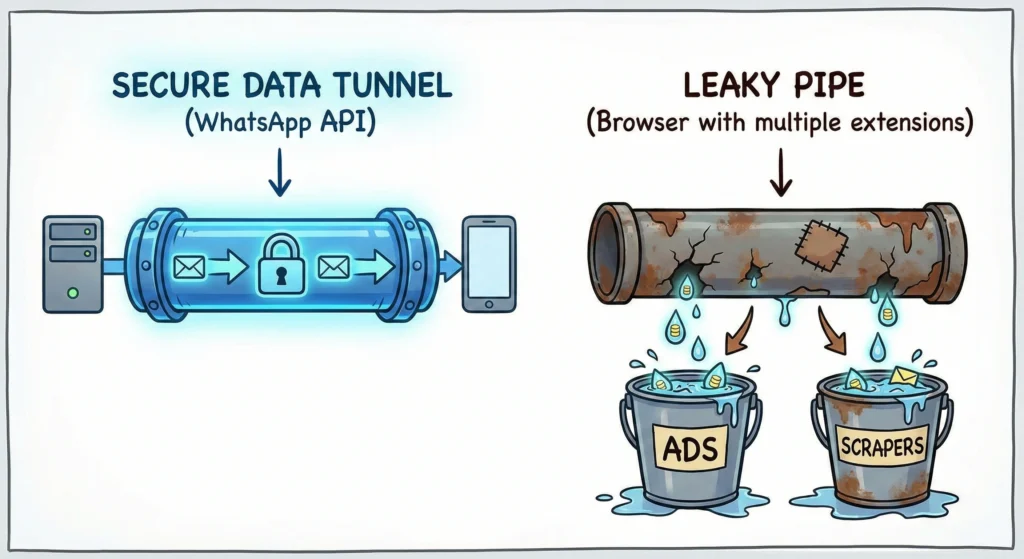
Consumer Extensions vs. Official WhatsApp Business API
The following table compares using a standard browser extension against using the official WhatsApp Business API platform.
| Feature | Browser Privacy Extension | Official WhatsApp Business API |
| Data Visibility | Can theoretically read all screen text | Encrypted and processed securely |
| GDPR Compliance | Risky (Unknown 3rd party access) | High (Data processing agreements) |
| Ban Risk | Moderate (Modifies browser behavior) | Zero (Official Meta Partner) |
| Screen Privacy | Blurs screen (Visual only) | Role-based access control |
| Cost | Usually Free | Paid per conversation/month |
| Best Use Case | Personal / Casual Chat | Professional / Enterprise |
How to Vet a WhatsApp Web Extension
If you must use an extension, follow these steps to reduce risk.
Step 1: Verify Developer Identity and Update Frequency
Go to the extension store page. Look at the "Offered by" line. Is it a company or a random name? Check the "Last Updated" date. If it hasn't been updated in 6 months, do not install it. Security threats change daily; old software is dangerous.
Step 2: Audit Manifest V3 Compliance
Google Chrome recently updated its extension system to "Manifest V3." These new standard limits what extensions can do. Check the extension description to see if it mentions Manifest V3 compliance. This generally means better security and performance.
Step 3: Analyze Privacy Policies for Data Collection Clauses
Before clicking install, read the privacy policy. Search for words like "collect," "share," or "partners." If the policy says they share data with "affiliated partners," stay away.
Secure Alternatives for Professional Use
The only way to guarantee 100% security for business communications is to stop using consumer tools for enterprise tasks.
Moving to the WhatsApp Business API for Guaranteed Compliance
The WhatsApp Business API connects your chats directly to a secure dashboard. It does not run inside a web browser that can be tampered with. It allows multiple users to log in with different permission levels, so you don't need screen-blurring hacks.
Waplify's Commitment to Data Security and Legal Terms
At Waplify, we provide a secure environment for your business chats. We are transparent about how we handle your information. You can review the Waplify Terms & Conditions | Usage, Billing, Legal Terms to understand our legal commitments. Furthermore, our Waplify Privacy Policy: Data Collection, Use & Security outlines exactly how we protect your data from third-party snooping.
Final Trust Score and Recommendations
- For Personal Use: 7/10 (Convenient but keep an eye on permissions).
- For Business Use: 3/10 (Too many compliance and security risks).
WhatsApp Web privacy extensions are a "band-aid" solution. They fix a visual problem (nosy people) but introduce a digital problem (data leakage).
If you are a business, do not rely on browser plugins to secure your data. The risks of account bans, data theft, and GDPR violations are too high. Transition to the WhatsApp Business API using a platform like Waplify to ensure your communications remain private, professional, and secure.